智能体与智能体式 AI
本节介绍如何使用 langchain4j-agentic 模块构建 agentic AI 应用。请注意,整个模块目前都应视为实验性功能,未来版本中可能会发生变化。
智能体系统
虽然目前并不存在一个被普遍接受的 AI agent 定义,但已经出现了若干模式,展示了如何协调和组合多个 AI 服务的能力,从而构建能够完成更复杂任务的 AI 驱动应用。这些模式通常被称为“agentic systems”或“agentic AI”。它们通常会使用大语言模型(LLM)来编排任务执行、管理工具调用,并在交互过程中维护上下文。
根据 Anthropic 研究人员最近发表的一篇文章,这类 Agentic System 架构大致可以分为两大类:workflow 和 pure agents。
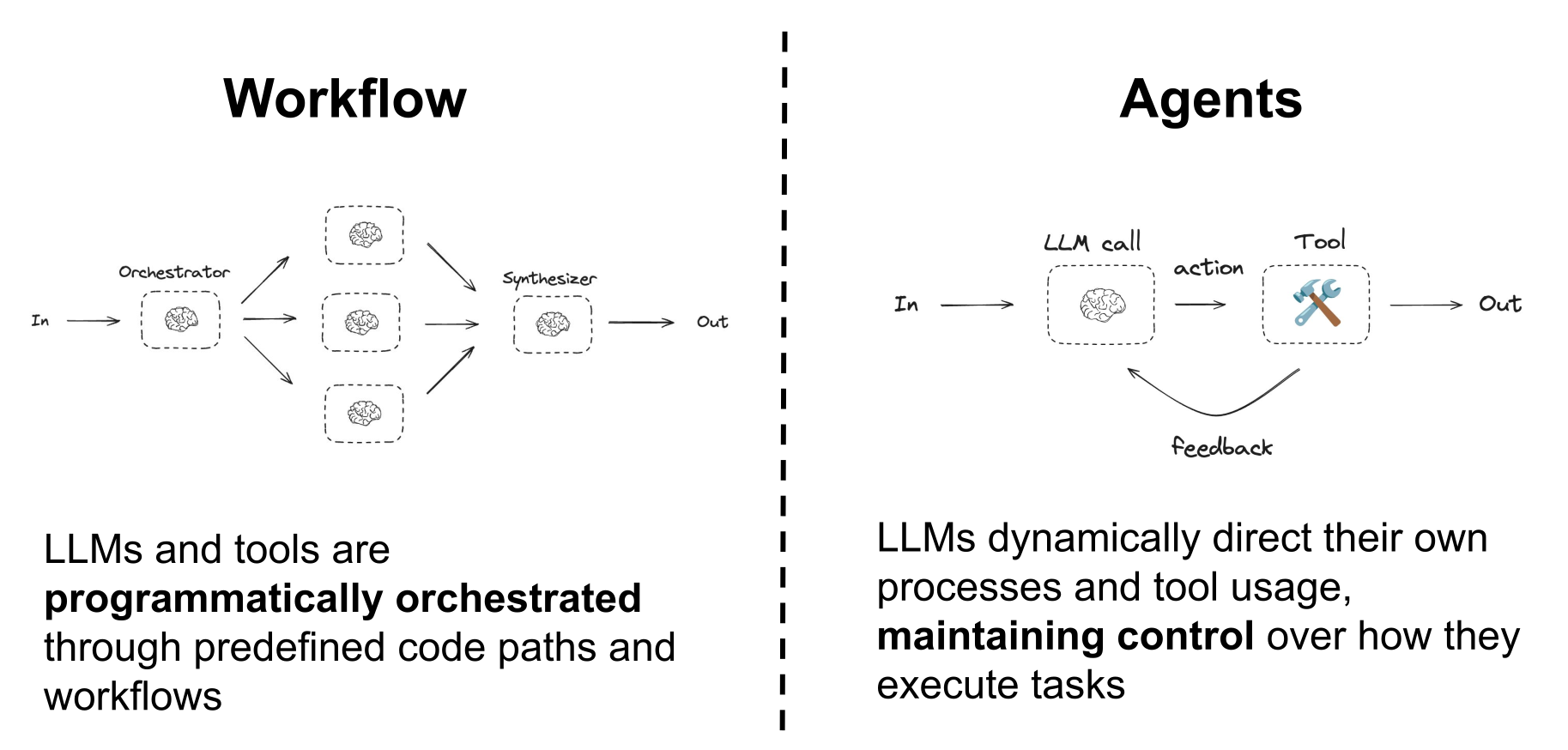
本教程讨论的 langchain4j-agentic 模块,提供了一组抽象与工具,用于帮助你构建 workflow 和纯 agentic AI 应用。它支持你定义 workflow、管理工具使用,并在不同 LLM 的交互之间维护上下文。
LangChain4j 中的智能体
在 LangChain4j 中,agent 使用 LLM 来执行某个特定任务或一组任务。agent 可以通过一个仅包含单个方法的接口来定义,方式与普通 AI service 类似,只需要额外添加 @Agent 注解。
public interface CreativeWriter {

    @UserMessage("""
            You are a creative writer.
            Generate a draft of a story no more than
            3 sentences long around the given topic.
            Return only the story and nothing else.
            The topic is {{topic}}.
            """)
    @Agent("Generates a story based on the given topic")
    String generateStory(@V("topic") String topic);
}
一个良好的实践是,同时通过这个注解提供 agent 用途的简短描述,尤其是在 pure agentic pattern 中打算使用它时。因为在这种场景下,其他 agent 需要了解该 agent 的能力,才能判断应如何以及何时使用它。这个描述也可以在构建 agent 时通过 agent builder 的 description 方法以编程方式提供。
agent 还必须有一个名称,用于在 agentic system 内唯一标识它。这个名称既可以在 @Agent 注解中指定,也可以在构建 agent 时通过 agent builder 的 name 方法以编程方式指定。如果不指定,则会默认采用被 @Agent 标注的方法名。
现在你可以使用 AgenticServices.agentBuilder() 方法,指定接口和要使用的 chat model,来构建这个 agent 的实例。
CreativeWriter creativeWriter = AgenticServices
        .agentBuilder(CreativeWriter.class)
        .chatModel(myChatModel)
        .outputKey("story")
        .build();
本质上,agent 就是普通的 AI service,拥有相同的能力,只是额外具备与其他 agent 组合起来构建更复杂 workflow 和 agentic system 的能力。
它与普通 AI service 的另一项主要区别,是增加了 outputKey 参数,用于指定 agent 调用结果会被写入哪个共享变量中,从而可以让同一 agentic system 中的其他 agent 继续使用。或者,输出名也可以像下面这样直接在 @Agent 注解中声明,而不是在代码里通过编程方式设置,这样就能在构建代码中省略它。
@Agent(outputKey = "story", description = "Generates a story based on the given topic")
AgenticServices 类提供了一组静态工厂方法,用于创建并定义 langchain4j-agentic 框架支持的各种 agent。
引入 AgenticScope
langchain4j-agentic 模块引入了 AgenticScope 这一概念,它是参与同一个 agentic system 的各个 agent 之间共享数据的集合。AgenticScope 用于存储共享变量,某个 agent 可以把它产出的结果写入其中,另一个 agent 则可以从中读取自己完成任务所需的信息。借助这种方式,agent 可以高效协作,按需共享信息和结果。
AgenticScope 还会自动记录其他相关信息,例如所有 agent 的调用序列及其响应。当 agentic system 的主 agent 被调用时,它会被自动创建;并在需要时通过回调以编程方式传递给你。随着后续介绍 langchain4j-agentic 实现的各种 agentic pattern,这些 AgenticScope 的不同用法都会通过具体示例说明清楚。
工作流模式
langchain4j-agentic 模块提供了一组抽象,用于以编程方式编排多个 agent,并构建 agentic workflow patterns。这些模式还可以相互组合,以创建更复杂的 workflow。
顺序工作流
Sequential workflow 是最简单的一种模式,其中多个 agent 按顺序依次调用,前一个 agent 的输出会作为下一个 agent 的输入。这种模式适合用于必须按固定顺序执行的一系列任务。
例如,前面定义的 CreativeWriter agent 很适合再搭配一个 AudienceEditor agent,它可以把生成的故事改写得更适合特定受众:
public interface AudienceEditor {

    @UserMessage("""
        You are a professional editor.
        Analyze and rewrite the following story to better align
        with the target audience of {{audience}}.
        Return only the story and nothing else.
        The story is "{{story}}".
        """)
    @Agent("Edits a story to better fit a given audience")
    String editStory(@V("story") String story, @V("audience") String audience);
}
再搭配一个非常类似的 StyleEditor,它会针对特定风格完成同样的工作。
public interface StyleEditor {

    @UserMessage("""
        You are a professional editor.
        Analyze and rewrite the following story to better fit and be more coherent with the {{style}} style.
        Return only the story and nothing else.
        The story is "{{story}}".
        """)
    @Agent("Edits a story to better fit a given style")
    String editStory(@V("story") String story, @V("style") String style);
}
请注意,这个 agent 的输入参数都用变量名进行了标注。也就是说,传给 agent 的参数值并不是直接提供的,而是从 AgenticScope 中取出同名共享变量的值。这样一来,该 agent 就能访问 workflow 中前序 agent 的输出。如果这个 agent 类在编译时启用了 -parameters 选项,使方法参数名在运行时仍然可用,那么 @V 注解也可以省略,变量名会自动从参数名推断出来。
到这里,就可以创建一个 sequential workflow,把这三个 agent 组合起来:CreativeWriter 的输出会作为 AudienceEditor 和 StyleEditor 的输入,而最终输出则是编辑完成的故事。
CreativeWriter creativeWriter = AgenticServices
        .agentBuilder(CreativeWriter.class)
        .chatModel(BASE_MODEL)
        .outputKey("story")
        .build();

AudienceEditor audienceEditor = AgenticServices
        .agentBuilder(AudienceEditor.class)
        .chatModel(BASE_MODEL)
        .outputKey("story")
        .build();

StyleEditor styleEditor = AgenticServices
        .agentBuilder(StyleEditor.class)
        .chatModel(BASE_MODEL)
        .outputKey("story")
        .build();

UntypedAgent novelCreator = AgenticServices
        .sequenceBuilder()
        .subAgents(creativeWriter, audienceEditor, styleEditor)
        .outputKey("story")
        .build();

Map<String, Object> input = Map.of(
        "topic", "dragons and wizards",
        "style", "fantasy",
        "audience", "young adults"
);

String story = (String) novelCreator.invoke(input);
这里的 novelCreator 实际上就是一个实现了 sequential workflow 的 agentic system,它把这三个 subagent 串起来按顺序调用。由于这个 agent 的定义没有提供类型化接口,因此 sequence agent builder 返回的是一个 UntypedAgent 实例。它是一种通用 agent,可以通过一个输入 map 来调用。
public interface UntypedAgent {
    @Agent
    Object invoke(Map<String, Object> input);
}
输入 map 中的值会被复制到 AgenticScope 的共享变量里,供 subagent 访问。novelCreator agent 的输出也同样来自 AgenticScope 中名为 story 的共享变量,这个变量在小说生成与编辑 workflow 的执行过程中,已经被前面的其他 agent 反复改写过。
需要注意的是,单个 agent 也可以被定义成 UntypedAgent,而不需要提供一个类型化接口。例如,CreativeWriter agent 也可以像下面这样定义:
UntypedAgent creativeWriter = AgenticServices.agentBuilder()
        .chatModel(BASE_MODEL)
        .description("Generate a story based on the given topic")
        .userMessage("""
                You are a creative writer.
                Generate a draft of a story no more than
                3 sentences long around the given topic.
                Return only the story and nothing else.
                The topic is {{topic}}.
                """)
        .inputKey(String.class, "topic")
        .returnType(String.class) // String is the default return type for untyped agents
        .outputKey("story")
        .build();
反过来,workflow agent 也可以选择提供一个类型化接口,这样就能以强类型方式调用,并获得强类型输入输出。在这种情况下,UntypedAgent 接口可以被替换成一个更具体的接口,例如:
public interface NovelCreator {

    @Agent
    String createNovel(@V("topic") String topic, @V("audience") String audience, @V("style") String style);
}
这样一来,novelCreator agent 就可以像下面这样创建和使用:
NovelCreator novelCreator = AgenticServices
        .sequenceBuilder(NovelCreator.class)
        .subAgents(creativeWriter, audienceEditor, styleEditor)
        .outputKey("story")
        .build();

String story = novelCreator.createNovel("dragons and wizards", "young adults", "fantasy");
循环工作流
更好发挥 LLM 能力的一种常见方式,是让它反复迭代润色一段文本,比如一个故事,不断调用能够修改或改进它的 agent。这个场景可以通过 loop workflow pattern 实现:持续调用某个 agent,直到满足某个条件为止。
可以使用一个 StyleScorer agent,根据文本风格与要求的一致程度给出评分。
public interface StyleScorer {

    @UserMessage("""
            You are a critical reviewer.
            Give a review score between 0.0 and 1.0 for the following
            story based on how well it aligns with the style '{{style}}'.
            Return only the score and nothing else.

            The story is: "{{story}}"
            """)
    @Agent("Scores a story based on how well it aligns with a given style")
    double scoreStyle(@V("story") String story, @V("style") String style);
}
然后就可以把这个 agent 和 StyleEditor 组合进一个 loop 中,不断改进故事,直到评分达到某个阈值,例如 0.8,或者循环次数达到上限。
StyleEditor styleEditor = AgenticServices
        .agentBuilder(StyleEditor.class)
        .chatModel(BASE_MODEL)
        .outputKey("story")
        .build();

StyleScorer styleScorer = AgenticServices
        .agentBuilder(StyleScorer.class)
        .chatModel(BASE_MODEL)
        .outputKey("score")
        .build();

UntypedAgent styleReviewLoop = AgenticServices
        .loopBuilder()
        .subAgents(styleScorer, styleEditor)
        .maxIterations(5)
        .exitCondition( agenticScope -> agenticScope.readState("score", 0.0) >= 0.8)
        .build();
这里,styleScorer agent 会把输出写入 AgenticScope 中名为 score 的共享变量,而 loop 的退出条件则会读取并判断这个变量。
exitCondition 方法接收一个 Predicate<AgenticScope> 作为参数,默认会在每一次 agent 调用之后都进行判断。这样一旦条件满足,loop 就会尽快结束,从而尽量减少 agent 调用次数。不过,你也可以通过在 loop builder 上配置 testExitAtLoopEnd(true),改为只在每轮 loop 结束时检查退出条件,也就是强制所有 agent 都先执行完,再统一判断。除此之外,exitCondition 还可以接收一个 BiPredicate<AgenticScope, Integer>,第二个参数就是当前 loop 的迭代计数。例如,下面这个 loop 定义:
UntypedAgent styleReviewLoop = AgenticServices
        .loopBuilder()
        .subAgents(styleScorer, styleEditor)
        .maxIterations(5)
        .testExitAtLoopEnd(true)
        .exitCondition( (agenticScope, loopCounter) -> {
            double score = agenticScope.readState("score", 0.0);
            return loopCounter <= 3 ? score >= 0.8 : score >= 0.6;
        })
        .build();
它会在前 3 次迭代中要求分数至少达到 0.8 才退出,否则就降低质量要求,在分数至少为 0.6 时终止;同时即使退出条件已经满足,也仍然会强制最后再调用一次 styleEditor。
在配置好这个 styleReviewLoop 之后,它就可以被当作一个单独 agent 来看待,并与 CreativeWriter 一起放入 sequence 中,构造一个 StyledWriter agent:
public interface StyledWriter {

    @Agent
    String writeStoryWithStyle(@V("topic") String topic, @V("style") String style);
}
它实现了一个更复杂的 workflow,把故事生成和风格审校过程结合在一起。
CreativeWriter creativeWriter = AgenticServices
        .agentBuilder(CreativeWriter.class)
        .chatModel(BASE_MODEL)
        .outputKey("story")
        .build();

StyledWriter styledWriter = AgenticServices
        .sequenceBuilder(StyledWriter.class)
        .subAgents(creativeWriter, styleReviewLoop)
        .outputKey("story")
        .build();

String story = styledWriter.writeStoryWithStyle("dragons and wizards", "comedy");
并行工作流
有时并行调用多个 agent 会很有价值,尤其是在它们可以针对同一输入彼此独立工作时。这个场景可以通过 parallel workflow pattern 实现:多个 agent 同时执行,然后再把它们的输出组合成单个结果。
例如,我们可以使用电影专家和美食专家,基于某种氛围生成几套理想夜晚方案,把符合该氛围的电影和餐食搭配在一起。
public interface FoodExpert {

    @UserMessage("""
        You are a great evening planner.
        Propose a list of 3 meals matching the given mood.
        The mood is {{mood}}.
        For each meal, just give the name of the meal.
        Provide a list with the 3 items and nothing else.
        """)
    @Agent
    List<String> findMeal(@V("mood") String mood);
}

public interface MovieExpert {

    @UserMessage("""
        You are a great evening planner.
        Propose a list of 3 movies matching the given mood.
        The mood is {mood}.
        Provide a list with the 3 items and nothing else.
        """)
    @Agent
    List<String> findMovie(@V("mood") String mood);
}
由于这两个专家的工作彼此独立,因此可以像下面这样使用 AgenticServices.parallelBuilder() 并行调用它们:
FoodExpert foodExpert = AgenticServices
        .agentBuilder(FoodExpert.class)
        .chatModel(BASE_MODEL)
        .outputKey("meals")
        .build();

MovieExpert movieExpert = AgenticServices
        .agentBuilder(MovieExpert.class)
        .chatModel(BASE_MODEL)
        .outputKey("movies")
        .build();

EveningPlannerAgent eveningPlannerAgent = AgenticServices
        .parallelBuilder(EveningPlannerAgent.class)
        .subAgents(foodExpert, movieExpert)
        .executor(Executors.newFixedThreadPool(2))
        .outputKey("plans")
        .output(agenticScope -> {
            List<String> movies = agenticScope.readState("movies", List.of());
            List<String> meals = agenticScope.readState("meals", List.of());

            List<EveningPlan> moviesAndMeals = new ArrayList<>();
            for (int i = 0; i < movies.size(); i++) {
                if (i >= meals.size()) {
                    break;
                }
                moviesAndMeals.add(new EveningPlan(movies.get(i), meals.get(i)));
            }
            return moviesAndMeals;
        })
        .build();

List<EveningPlan> plans = eveningPlannerAgent.plan("romantic");
这里,定义在 EveningPlannerAgent 中的 output 函数会从 AgenticScope 中取出两个 subagent 的结果,并把它们组合成 EveningPlan 列表,将电影与餐食按氛围匹配起来。虽然 output 方法在 parallel workflow 中尤其重要,但实际上它也可以用于任何 workflow pattern,来定义如何把多个 subagent 的输出组合为单一结果,而不只是简单返回 AgenticScope 中的某个值。executor 方法则允许你可选地提供一个 Executor 来并行执行 subagent,否则默认会使用内部的 cached thread pool。
并行映射工作流
Parallel mapper workflow 是 parallel workflow 的一种变体,在这种模式下,同一个 sub-agent 会针对一个集合中的每个元素并行执行一次。换句话说,它会对列表中的所有元素做 map 处理,针对每个元素独立地多次调用同一个 sub-agent。这在你希望并发地对一批输入应用相同操作时非常有用。
例如,我们来创建一个 agent,用于为一组人生成个性化 horoscope:
public interface PersonAstrologyAgent {

    @SystemMessage("""
        You are an astrologist that generates horoscopes based on the user's name and zodiac sign.
        """)
    @UserMessage("""
        Generate the horoscope for {{person}}.
        The person has a name and a zodiac sign. Use both to create a personalized horoscope.
        """)
    @Agent(description = "An astrologist that generates horoscopes for a person", outputKey = "horoscope")
    String horoscope(@V("person") Person person);
}
使用 AgenticServices.parallelMapperBuilder(),你可以创建一个 workflow,把这个 agent 扇出到一个集合上,并自动为每个元素创建一个执行实例:
PersonAstrologyAgent personAstrologyAgent = AgenticServices
        .agentBuilder(PersonAstrologyAgent.class)
        .chatModel(BASE_MODEL)
        .outputKey("horoscope")
        .build();

BatchHoroscopeAgent agent = AgenticServices
        .parallelMapperBuilder(BatchHoroscopeAgent.class)
        .subAgents(personAstrologyAgent)
        .itemsProvider("persons")
        .executor(Executors.newFixedThreadPool(3))
        .build();

List<Person> persons = List.of(
        new Person("Mario", "aries"),
        new Person("Luigi", "pisces"),
        new Person("Peach", "leo"));

List<String> horoscopes = agent.generateHoroscopes(persons);
其中 BatchHoroscopeAgent 定义如下:
public interface BatchHoroscopeAgent extends AgentInstance {

    @Agent
    List<String> generateHoroscopes(@V("persons") List<Person> persons);
}
itemsProvider 用于指定哪个参数包含要迭代的集合。不过,如果不存在歧义,而且只有一个参数是可迭代的(Collection 或数组),就像这个例子一样,也可以安全地省略它。每个 sub-agent 实例都会接收集合中的一个元素,当所有实例执行完成后,它们各自的结果会自动聚合成一个列表,并作为 workflow 的最终结果返回。与 parallel workflow 一样,这里也可以选择性地提供一个 Executor。
需要注意的是,由于这里实际上是在重复地使用同一个 agent 以不同参数独立执行相同任务,所以为它维护 ChatMemory 并没有意义。因此,如果 parallel mapper workflow 尝试使用一个配置了 ChatMemory 的 sub-agent,LangChain4j 会抛出异常。
条件工作流
另一种常见需求是,仅当满足特定条件时才调用某个 agent。例如,先对用户请求进行分类,再根据分类结果交由不同的 agent 处理,就会很有用。这个场景可以通过下面这个 CategoryRouter 实现:
public interface CategoryRouter {

    @UserMessage("""
        Analyze the following user request and categorize it as 'legal', 'medical' or 'technical'.
        In case the request doesn't belong to any of those categories categorize it as 'unknown'.
        Reply with only one of those words and nothing else.
        The user request is: '{{request}}'.
        """)
    @Agent("Categorizes a user request")
    RequestCategory classify(@V("request") String request);
}
它会返回一个 RequestCategory 枚举值。
public enum RequestCategory {
    LEGAL, MEDICAL, TECHNICAL, UNKNOWN
}
这样一来,如果我们定义了一个类似下面这样的 MedicalExpert agent:
public interface MedicalExpert {

    @UserMessage("""
        You are a medical expert.
        Analyze the following user request under a medical point of view and provide the best possible answer.
        The user request is {{request}}.
        """)
    @Agent("A medical expert")
    String medical(@V("request") String request);
}
再加上类似的 LegalExpert 和 TechnicalExpert agents,就可以创建一个 ExpertRouterAgent:
public interface ExpertRouterAgent {

    @Agent
    String ask(@V("request") String request);
}
它实现了一个 conditional workflow,会根据用户请求的类别选择并调用对应的 agent。
CategoryRouter routerAgent = AgenticServices
        .agentBuilder(CategoryRouter.class)
        .chatModel(BASE_MODEL)
        .outputKey("category")
        .build();

MedicalExpert medicalExpert = AgenticServices
        .agentBuilder(MedicalExpert.class)
        .chatModel(BASE_MODEL)
        .outputKey("response")
        .build();
LegalExpert legalExpert = AgenticServices
        .agentBuilder(LegalExpert.class)
        .chatModel(BASE_MODEL)
        .outputKey("response")
        .build();
TechnicalExpert technicalExpert = AgenticServices
        .agentBuilder(TechnicalExpert.class)
        .chatModel(BASE_MODEL)
        .outputKey("response")
        .build();

UntypedAgent expertsAgent = AgenticServices.conditionalBuilder()
        .subAgents( agenticScope -> agenticScope.readState("category", RequestCategory.UNKNOWN) == RequestCategory.MEDICAL, medicalExpert)
        .subAgents( agenticScope -> agenticScope.readState("category", RequestCategory.UNKNOWN) == RequestCategory.LEGAL, legalExpert)
        .subAgents( agenticScope -> agenticScope.readState("category", RequestCategory.UNKNOWN) == RequestCategory.TECHNICAL, technicalExpert)
        .build();

ExpertRouterAgent expertRouterAgent = AgenticServices
        .sequenceBuilder(ExpertRouterAgent.class)
        .subAgents(routerAgent, expertsAgent)
        .outputKey("response")
        .build();

String response = expertRouterAgent.ask("I broke my leg what should I do");
可选智能体
在某些情况下,如果某个 workflow 中的 sub-agent 所需输入参数在 AgenticScope 中不可用,那么这个 sub-agent 实际上没有必要执行。默认情况下,当 agent 找不到某个必需参数时,整个 agentic system 会因为 MissingArgumentException 而失败。不过,也可以把某个 agent 标记为 optional,这样当它缺少任意参数时,就会被静默跳过,而不是让整个 workflow 失败。
这可以通过 agent builder 的 optional 方法实现。例如,继续沿用前面定义的 sequential workflow,我们可以把 AudienceEditor agent 设置为 optional。这样一来,即使输入里没有 audience,故事仍然会被生成并做 style 编辑。
CreativeWriter creativeWriter = AgenticServices
        .agentBuilder(CreativeWriter.class)
        .chatModel(BASE_MODEL)
        .outputKey("story")
        .build();

AudienceEditor audienceEditor = AgenticServices
        .agentBuilder(AudienceEditor.class)
        .chatModel(BASE_MODEL)
        .optional(true)
        .outputKey("story")
        .build();

StyleEditor styleEditor = AgenticServices
        .agentBuilder(StyleEditor.class)
        .chatModel(BASE_MODEL)
        .outputKey("story")
        .build();

UntypedAgent novelCreator = AgenticServices
        .sequenceBuilder()
        .subAgents(creativeWriter, audienceEditor, styleEditor)
        .outputKey("story")
        .build();

// No "audience" key is provided, so the audienceEditor will be skipped
Map<String, Object> input = Map.of(
        "topic", "dragons and wizards",
        "style", "fantasy"
);

String story = (String) novelCreator.invoke(input);
这里,audienceEditor 被配置成 optional。由于输入 map 中不包含 AudienceEditor 所需的 audience 键,因此它的调用会被跳过,workflow 会直接继续执行 StyleEditor。同样地,也可以通过 @Agent 注解的属性 @Agent(optional = true) 以声明式方式把 agent 标记为 optional。
异步智能体
默认情况下,所有 agent 调用都在触发根 agent 的同一个线程中执行,因此它们是同步的,也就是说 agentic system 会等待每个 agent 完成后,才会继续执行下一个 agent。不过在很多场景下,这种阻塞等待并不是必要的。将某个 agent 以异步方式调用,可以让 agentic system 在不等待它完成的情况下继续执行。
因此,可以通过 agent builder 的 async 方法把某个 agent 标记为 asynchronous。这样做之后,该 agent 会在独立线程中执行,而 agentic system 会继续推进,不会阻塞等待它完成。异步 agent 的结果一旦生成,就会被写入 AgenticScope;而只有当后续其他 agent 真正需要这个结果作为输入时,AgenticScope 才会阻塞等待它可用。
例如,在 parallel workflow 一节中讨论过的 FoodExpert 和 MovieExpert 两个 agent 彼此独立。如果把它们标记为 asynchronous,那么即便它们被放在 sequential workflow 中,也仍然会同时执行。
FoodExpert foodExpert = AgenticServices
        .agentBuilder(FoodExpert.class)
        .chatModel(BASE_MODEL)
        .async(true)
        .outputKey("meals")
        .build();

MovieExpert movieExpert = AgenticServices
        .agentBuilder(MovieExpert.class)
        .chatModel(BASE_MODEL)
        .async(true)
        .outputKey("movies")
        .build();

EveningPlannerAgent eveningPlannerAgent = AgenticServices
        .sequenceBuilder(EveningPlannerAgent.class)
        .subAgents(foodExpert, movieExpert)
        .executor(Executors.newFixedThreadPool(2))
        .outputKey("plans")
        .output(agenticScope -> {
            List<String> movies = agenticScope.readState("movies", List.of());
            List<String> meals = agenticScope.readState("meals", List.of());

            List<EveningPlan> moviesAndMeals = new ArrayList<>();
            for (int i = 0; i < movies.size(); i++) {
                if (i >= meals.size()) {
                    break;
                }
                moviesAndMeals.add(new EveningPlan(movies.get(i), meals.get(i)));
            }
            return moviesAndMeals;
        })
        .build();

List<EveningPlan> plans = eveningPlannerAgent.plan("romantic");
流式智能体
为了支持流式输出,也可以创建返回 TokenStream 的 agent:
public interface StreamingCreativeWriter {

    @UserMessage("""
            You are a creative writer.
            Generate a draft of a story no more than
            3 sentences long around the given topic.
            Return only the story and nothing else.
            The topic is {{topic}}.
            """)
    @Agent("Generates a story based on the given topic")
    TokenStream generateStory(@V("topic") String topic);
}
随后把它配置为使用 StreamingChatModel,这样就可以在内容生成过程中边生成边消费结果,而不用一直等到 agent 调用全部完成。
StreamingCreativeWriter creativeWriter = AgenticServices.agentBuilder(StreamingCreativeWriter.class)
        .streamingChatModel(streamingBaseModel())
        .outputKey("story")
        .build();

TokenStream tokenStream = creativeWriter.generateStory("dragons and wizards");
当 streaming agent 被放进 agentic system 中时,只有当它是最后一个被调用的 agent 时,它的流式响应才能向整个系统传播。否则,它的行为就类似 asynchronous agent,后续 agent 必须等它的流式结果完整结束后,才能取得并使用结果。
例如,下面这个 StreamingReviewedWriter agent:
public interface StreamingReviewedWriter {
    @Agent
    TokenStream writeStory(@V("topic") String topic, @V("audience") String audience, @V("style") String style);
}
它是由 3 个 streaming agent 顺序组成的:
StreamingCreativeWriter creativeWriter = AgenticServices.agentBuilder(StreamingCreativeWriter.class)
        .streamingChatModel(streamingBaseModel())
        .outputKey("story")
        .build();

StreamingAudienceEditor audienceEditor = AgenticServices.agentBuilder(StreamingAudienceEditor.class)
        .streamingChatModel(streamingBaseModel())
        .outputKey("story")
        .build();

StreamingStyleEditor styleEditor = AgenticServices.agentBuilder(StreamingStyleEditor.class)
        .streamingChatModel(streamingBaseModel())
        .outputKey("story")
        .build();

StreamingReviewedWriter novelCreator = AgenticServices.sequenceBuilder(StreamingReviewedWriter.class)
        .subAgents(creativeWriter, audienceEditor, styleEditor)
        .outputKey("story")
        .build();
当调用这个 novelCreator agent 时:
TokenStream tokenStream = novelCreator.writeStory("dragons and wizards", "young adults", "fantasy");
前两个 agent 的流式响应都会先在内部被完整消费完,后续 agent 才能启动;最终只有最后一个 StyleEditor agent 的流式响应,会作为整个 novelCreator 的流式响应向外传播。
错误处理
在复杂的 agentic system 中,可能会出现很多问题,比如某个 agent 无法产出结果、外部工具不可用,或者执行过程中发生意外错误。
因此,errorHandler 方法允许你为 agentic system 提供一个错误处理器。它本质上是一个函数,会把如下定义的 ErrorContext:
record ErrorContext(String agentName, AgenticScope agenticScope, AgentInvocationException exception) { }
转换为一个 ErrorRecoveryResult。这个结果有 3 种可能:
ErrorRecoveryResult.throwException():默认行为,直接把导致问题的异常继续抛到根调用方。ErrorRecoveryResult.retry():重试该 agent 的调用,必要时可以在重试前执行一些修正操作。ErrorRecoveryResult.result(Object result):忽略错误,并把提供的结果作为失败 agent 的输出返回。
例如,在最开始的 sequential workflow 示例中,如果遗漏了某个必需参数:
UntypedAgent novelCreator = AgenticServices
        .sequenceBuilder()
        .subAgents(creativeWriter, audienceEditor, styleEditor)
        .outputKey("story")
        .build();

Map<String, Object> input = Map.of(
        // missing "topic" entry to trigger an error
        // "topic", "dragons and wizards",
        "style", "fantasy",
        "audience", "young adults"
);
执行时就会因为类似下面的异常而失败:
dev.langchain4j.agentic.agent.MissingArgumentException: Missing argument: topic
在这个场景下,可以通过配置一个合适的 errorHandler 来处理错误并恢复执行,例如在其中补上缺失参数:
UntypedAgent novelCreator = AgenticServices.sequenceBuilder()
        .subAgents(creativeWriter, audienceEditor, styleEditor)
        .errorHandler(errorContext -> {
            if (errorContext.agentName().equals("generateStory") &&
                    errorContext.exception() instanceof MissingArgumentException mEx && mEx.argumentName().equals("topic")) {
                errorContext.agenticScope().writeState("topic", "dragons and wizards");
                errorRecoveryCalled.set(true);
                return ErrorRecoveryResult.retry();
            }
            return ErrorRecoveryResult.throwException();
        })
        .outputKey("story")
        .build();
可观测性
跟踪和记录 agent 调用,对于调试以及理解整个 agentic system 的聚合行为往往非常关键。为此,langchain4j-agentic 模块允许你通过各类 agent builder 的 listener 方法注册一个 AgentListener,它会接收到所有 agent 调用及其结果的通知,接口定义如下:
public interface AgentListener {

    default void beforeAgentInvocation(AgentRequest agentRequest) { }
    default void afterAgentInvocation(AgentResponse agentResponse) { }
    default void onAgentInvocationError(AgentInvocationError agentInvocationError) { }

    default void afterAgenticScopeCreated(AgenticScope agenticScope) { }
    default void beforeAgenticScopeDestroyed(AgenticScope agenticScope) { }

    default void beforeToolExecution(BeforeToolExecution beforeToolExecution) { }
    default void afterToolExecution(ToolExecution toolExecution) { }

    default boolean inheritedBySubagents() {
        return false;
    }
}
请注意,这个接口中的所有方法都带有默认空实现,因此你只需要实现自己关心的方法即可。这也意味着未来版本即使为该接口新增方法,也不会破坏已有实现。
例如,下面对 CreativeWriter agent 的配置,会在它被调用以及故事生成完成时,把信息打印到控制台:
CreativeWriter creativeWriter = AgenticServices.agentBuilder(CreativeWriter.class)
        .chatModel(baseModel())
        .outputKey("story")
        .listener(new AgentListener() {
            @Override
            public void beforeAgentInvocation(AgentRequest request) {
                System.out.println("Invoking CreativeWriter with topic: " + request.inputs().get("topic"));
            }

            @Override
            public void afterAgentInvocation(AgentResponse response) {
                System.out.println("CreativeWriter generated this story: " + response.output());
            }
        })
        .build();
这些 listener 方法分别接收 AgentRequest 和 AgentResponse 作为参数,它们会提供与 agent 调用相关的有用信息,例如 agent 名称、接收到的输入、产出的输出,以及这次调用所使用的 AgenticScope 实例。要注意的是,这些方法会在执行 agent 调用的同一个线程中同步触发,因此不应该在里面执行长时间阻塞操作。
AgentListener 有两个重要特性:
- 可组合:你可以通过多次调用
listener方法,在同一个 agent 上注册多个 listener,它们会按照注册顺序依次收到通知。 - 可选的层级继承:默认情况下,listener 只作用于它直接注册的那个 agent;但如果把它的
inheritedBySubagents方法改为返回true,那么它也会被所有子孙级 subagent 继承。在这种情况下,注册在顶层 agent 上的 listener 也会收到任意层级 subagent 的调用通知,并与这些 subagent 自己注册的 listener 一起组合生效。
监测
基于 AgentListener 提供的 observability 能力,langchain4j-agentic 模块还内置了一个该接口的实现,名为 AgentMonitor。它会自动继承到所有 subagent,其目标是在内存中以树形结构记录所有 agent 调用,便于你在 agentic system 执行过程中或结束后查看调用顺序及其结果。你可以通过 agent builder 的 listener 方法,把这个 monitor 注册到 agentic system 的根 agent 上。
为了给出一个更完整的例子,我们重新考虑前面那个用于生成并循环改写故事、直到风格质量达标为止的 loop workflow,并在上面注册几个 listener,其中包括一个 AgentMonitor。
AgentMonitor monitor = new AgentMonitor();

CreativeWriter creativeWriter = AgenticServices.agentBuilder(CreativeWriter.class)
        .listener(new AgentListener() {
            @Override
            public void beforeAgentInvocation(AgentRequest request) {
                System.out.println("Invoking CreativeWriter with topic: " + request.inputs().get("topic"));
            }
        })
        .chatModel(baseModel())
        .outputKey("story")
        .build();

StyleEditor styleEditor = AgenticServices.agentBuilder(StyleEditor.class)
        .chatModel(baseModel())
        .outputKey("story")
        .build();

StyleScorer styleScorer = AgenticServices.agentBuilder(StyleScorer.class)
        .name("styleScorer")
        .chatModel(baseModel())
        .outputKey("score")
        .build();

UntypedAgent styleReviewLoop = AgenticServices.loopBuilder()
        .subAgents(styleScorer, styleEditor)
        .maxIterations(5)
        .exitCondition(agenticScope -> agenticScope.readState("score", 0.0) >= 0.8)
        .build();

UntypedAgent styledWriter = AgenticServices.sequenceBuilder()
        .subAgents(creativeWriter, styleReviewLoop)
        .listener(monitor)
        .listener(new AgentListener() {
            @Override
            public void afterAgentInvocation(AgentResponse response) {
                if (response.agentName().equals("styleScorer")) {
                    System.out.println("Current score: " + response.output());
                }
            }
        })
        .outputKey("story")
        .build();
这里,第一个 listener 被直接注册到了 creativeWriter agent 上,因此只有在这个 agent 被调用时,它才会记录请求 topic。第二个 listener 被注册到了顶层的 styledWriter agent 上,因此它也会被传播到该 agent 层级中的所有 subagent。正因为如此,这个 listener 的 afterAgentInvocation 方法才会检查当前被调用的 agent 是否是 styleScorer,只有在这种情况下才记录当前风格评分。
最后,AgentMonitor 实例也作为一个额外 listener 被注册到顶层 styledWriter agent 上,并会与另外两个 listener 自动组合,从而跟踪整个 agentic system 中的全部 agent 调用。
当像下面这样调用 styledWriter agent 时:
Map<String, Object> input = Map.of(
        "topic", "dragons and wizards",
        "style", "comedy");
String story = styledWriter.invoke(input);
AgentMonitor 会把所有 agent 调用记录成一棵树,其中还会包含开始时间、结束时间、持续时间、token 数、输入以及输出等信息。此时你就可以从 monitor 中取出这些记录,并把它们打印到控制台做检查。
MonitoredExecution execution = monitor.successfulExecutions().get(0);
System.out.println(execution);
输出会揭示出生成并改写故事所需的嵌套 agent 调用序列,大致如下:
AgentInvocation{agent=Sequential, startTime=2026-03-18T17:27:28.099439515, finishTime=2026-03-18T17:27:38.683498783, duration=10584 ms, tokens=0, inputs={topic=dragons and wiz..., style=comedy}, output=In a realm wher...}
|=> AgentInvocation{agent=generateStory, startTime=2026-03-18T17:27:28.1.13.0287, finishTime=2026-03-18T17:27:31.033561726, duration=2932 ms, tokens=127, inputs={topic=dragons and wiz...}, output=In a realm wher...}
|=> AgentInvocation{agent=reviewLoop, startTime=2026-03-18T17:27:31.035952285, finishTime=2026-03-18T17:27:38.683438433, duration=7647 ms, tokens=0, inputs={score=0.8, topic=dragons and wiz..., style=comedy, story=In a realm wher...}, output=null}
    |=> AgentInvocation{agent=scoreStyle, iteration=0, startTime=2026-03-18T17:27:31.036155107, finishTime=2026-03-18T17:27:31.671478699, duration=635 ms, tokens=152, inputs={style=comedy, story=In a realm wher...}, output=0.2}
    |=> AgentInvocation{agent=editStory, iteration=0, startTime=2026-03-18T17:27:31.671711250, finishTime=2026-03-18T17:27:38.182881941, duration=6511 ms, tokens=491, inputs={style=comedy, story=In a realm wher...}, output=In a realm wher...}
    |=> AgentInvocation{agent=scoreStyle, iteration=1, startTime=2026-03-18T17:27:38.183021641, finishTime=2026-03-18T17:27:38.683085876, duration=500 ms, tokens=439, inputs={style=comedy, story=In a realm wher...}, output=0.8}
最后,你还可以使用 HtmlReportGenerator 类暴露的静态 generateReport 方法,为 AgentMonitor 收集到的数据生成可视化 HTML 报告,既能展示 agentic system 的拓扑,也能展示已记录的执行过程。例如,对上面的执行结果生成报告:
HtmlReportGenerator.generateReport(monitor, Path.of("review-loop.html"));
它会在当前工作目录下生成一个名为 review-loop.html 的报告文件,效果类似如下:
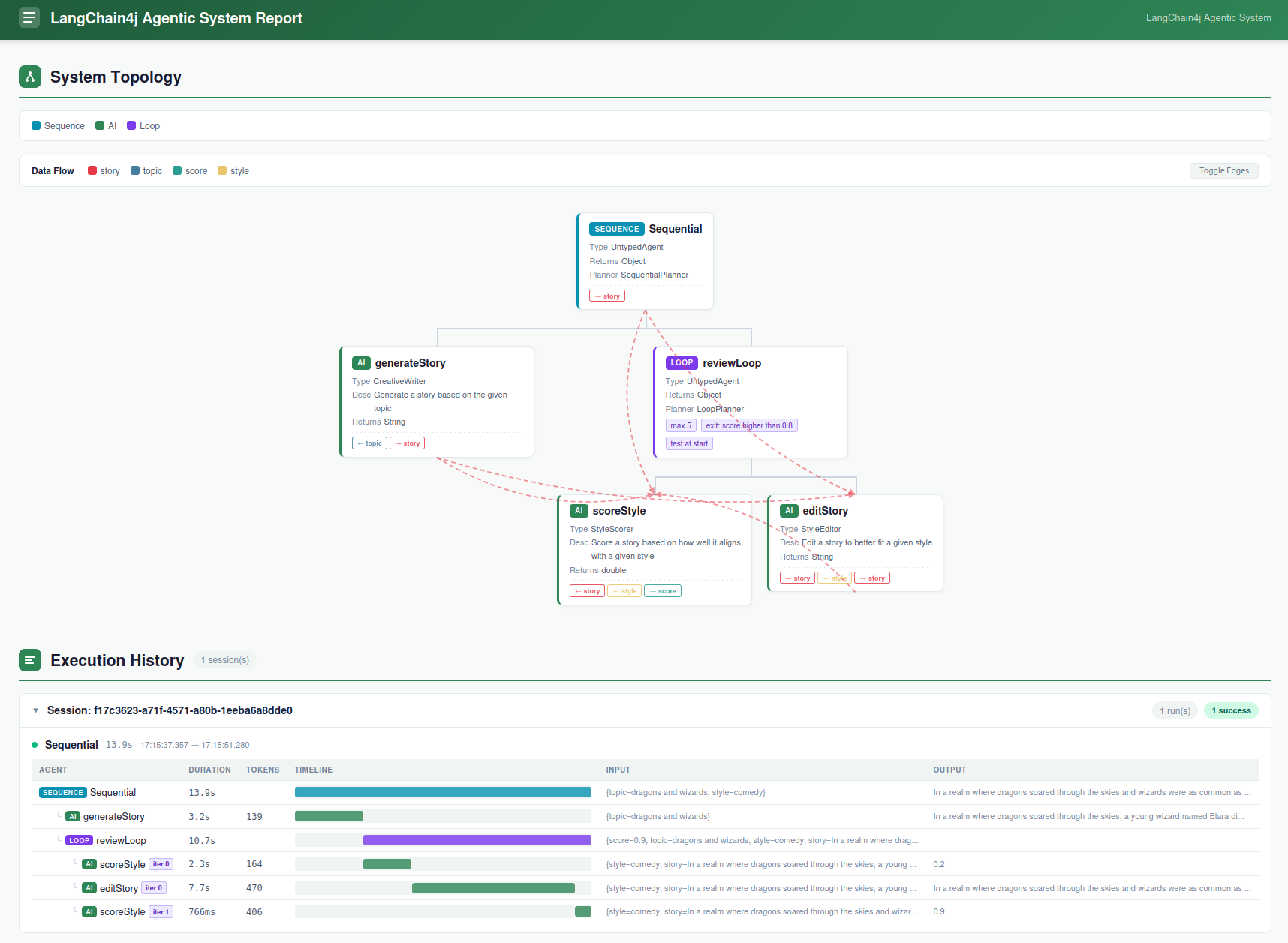
除了手动创建 AgentMonitor 并将其注册为 listener 之外,还有另一种方式:让你的 agent service 接口直接继承 MonitoredAgent。这样 builder 会自动创建并注册一个 AgentMonitor,你还可以通过 agent 实例上的 agentMonitor() 方法直接拿到这个 monitor。
例如,把前面例子中的 sequence agent 改写成一个类型化并自带监控能力的 agent,可以定义一个同时继承 MonitoredAgent 的 StyledWriter 接口:
public interface StyledWriter extends MonitoredAgent {
    @Agent("Write a creative story about the given topic")
    String generateStoryWithStyle(@V("topic") String topic, @V("style") String style);
}
构建这个 agent 时,就不再需要显式地创建或注册 AgentMonitor:
StyledWriter styledWriter = AgenticServices.sequenceBuilder(StyledWriter.class)
        .subAgents(creativeWriter, styleReviewLoop)
        .outputKey("story")
        .build();
monitor 会被自动注册,并且可以随时直接从 agent 实例上取得:
AgentMonitor monitor = styledWriter.agentMonitor();
声明式 API
到目前为止,我们讨论的所有 workflow pattern 都是通过编程式 API 定义的。但这些模式也都可以通过声明式 API 来定义,这样可以让 workflow 的写法更加简洁、可读。langchain4j-agentic 模块提供了一组注解,用于以更声明式的方式定义 agents 及其 workflows。
例如,前面以编程方式定义的 parallel workflow EveningPlannerAgent,可以用声明式 API 改写成如下形式:
public interface EveningPlannerAgent {

    @ParallelAgent( outputKey = "plans",
            subAgents = { FoodExpert.class, MovieExpert.class })
    List<EveningPlan> plan(@V("mood") String mood);

    @ParallelExecutor
    static Executor executor() {
        return Executors.newFixedThreadPool(2);
    }

    @Output
    static List<EveningPlan> createPlans(@V("movies") List<String> movies, @V("meals") List<String> meals) {
        List<EveningPlan> moviesAndMeals = new ArrayList<>();
        for (int i = 0; i < movies.size(); i++) {
            if (i >= meals.size()) {
                break;
            }
            moviesAndMeals.add(new EveningPlan(movies.get(i), meals.get(i)));
        }
        return moviesAndMeals;
    }
}
这里,被 @Output 标注的静态方法定义了如何把 subagent 的输出组合成一个最终结果,这与前面把 AgenticScope 函数传给 output 方法的用法完全对应。
定义好这个接口之后,就可以通过 AgenticServices.createAgenticSystem() 方法创建 EveningPlannerAgent 实例,并像之前一样直接使用它:
EveningPlannerAgent eveningPlannerAgent = AgenticServices
        .createAgenticSystem(EveningPlannerAgent.class, BASE_MODEL);
List<EveningPlan> plans = eveningPlannerAgent.plan("romantic");
在这个例子中,AgenticServices.createAgenticSystem() 还接收了一个 ChatModel,它会默认用于这个 agentic system 中创建的全部 subagent。不过,你也可以通过在某个 subagent 的定义中增加一个被 @ChatModelSupplier 标注的静态方法,为它单独指定不同的 ChatModel。例如,FoodExpert agent 可以这样定义自己的 ChatModel:
public interface FoodExpert {

    @UserMessage("""
        You are a great evening planner.
        Propose a list of 3 meals matching the given mood.
        The mood is {{mood}}.
        For each meal, just give the name of the meal.
        Provide a list with the 3 items and nothing else.
        """)
    @Agent(outputKey = "meals")
    List<String> findMeal(@V("mood") String mood);

    @ChatModelSupplier
    static ChatModel chatModel() {
        return FOOD_MODEL;
    }
}
以类似方式,只要在 agent 接口上再定义其他带有相应注解的 static 方法,还可以声明式地配置 agent 的其他方面,例如 chat memory、可用 tools 等。这些方法默认不应带参数,除非下表中特别说明。可用于此目的的注解如下:
| Annotation Name | Description |
|---|---|
@ChatModelSupplier | 返回该 agent 要使用的 ChatModel。 |
@StreamingChatModelSupplier | 返回该 agent 要使用的 StreamingChatModel。 |
@ChatMemorySupplier | 返回该 agent 要使用的 ChatMemory。 |
@ChatMemoryProviderSupplier | 返回该 agent 要使用的 ChatMemoryProvider。这个方法需要一个 Object 参数,用作创建 memory 时的 memoryId。 |
@ContentRetrieverSupplier | 返回该 agent 要使用的 ContentRetriever。 |
@AgentListenerSupplier | 返回该 agent 要使用的 AgentListener。 |
@RetrievalAugmentorSupplier | 返回该 agent 要使用的 RetrievalAugmentor。 |
@ToolsSupplier | 返回该 agent 要使用的一个或多个 tool。 可以返回单个 Object,也可以返回 Object[]。 |
@ToolProviderSupplier | 返回该 agent 要使用的 ToolProvider。 |
为了再举一个声明式 API 的例子,下面我们把 conditional workflow 一节中的 ExpertsAgent 改写成声明式版本。
public interface ExpertsAgent {

    @ConditionalAgent(outputKey = "response",
            subAgents = { MedicalExpert.class, TechnicalExpert.class, LegalExpert.class })
    String askExpert(@V("request") String request);

    @ActivationCondition(MedicalExpert.class)
    static boolean activateMedical(@V("category") RequestCategory category) {
        return category == RequestCategory.MEDICAL;
    }

    @ActivationCondition(TechnicalExpert.class)
    static boolean activateTechnical(@V("category") RequestCategory category) {
        return category == RequestCategory.TECHNICAL;
    }

    @ActivationCondition(LegalExpert.class)
    static boolean activateLegal(@V("category") RequestCategory category) {
        return category == RequestCategory.LEGAL;
    }
}
这里,@ActivationCondition 注解上的值表示:当被注解的方法返回 true 时,应激活哪些 agent 类。
需要注意的是,定义 agent 和 agentic system 时,编程式风格与声明式风格是可以混用的。也就是说,一个 agent 完全可以一部分通过注解配置,一部分通过 agent builder 配置。你也可以先完全声明式地定义一个 agent,然后在编程式构建 agentic system 时,把这个 agent 的类直接作为 subagent 使用。例如,完全可以像下面这样声明式地定义 CreativeWriter 和 AudienceEditor:
public interface CreativeWriter {

    @UserMessage("""
            You are a creative writer.
            Generate a draft of a story long no more than 3 sentence around the given topic.
            Return only the story and nothing else.
            The topic is {{topic}}.
            """)
    @Agent(description = "Generate a story based on the given topic", outputKey = "story")
    String generateStory(@V("topic") String topic);

    @ChatModelSupplier
    static ChatModel chatModel() {
        return baseModel();
    }
}

public interface AudienceEditor {

    @UserMessage("""
        You are a professional editor.
        Analyze and rewrite the following story to better align with the target audience of {{audience}}.
        Return only the story and nothing else.
        The story is "{{story}}".
        """)
    @Agent(description = "Edit a story to better fit a given audience", outputKey = "story")
    String editStory(@V("story") String story, @V("audience") String audience);

    @ChatModelSupplier
    static ChatModel chatModel() {
        return baseModel();
    }
}
然后再在编程式 sequence 中,仅通过它们的类把它们串起来:
UntypedAgent novelCreator = AgenticServices.sequenceBuilder()
        .subAgents(CreativeWriter.class, AudienceEditor.class)
        .outputKey("story")
        .build();

Map<String, Object> input = Map.of(
        "topic", "dragons and wizards",
        "audience", "young adults"
);

String story = (String) novelCreator.invoke(input);
强类型输入与输出
到目前为止,所有传入和传出 agent 的 input/output key 都是简单的 String。但这种方式容易出错,因为它依赖 key 的拼写完全正确。同时,它也无法把这些变量强绑定到具体类型上,因此当你从 AgenticScope 读取值时,就不得不手动做类型检查和强制转换。为避免这些问题,也可以使用 TypedKey 接口来定义强类型的 input/output key。
例如,在前面 conditional workflow 的专家路由示例中,可以把输入和输出 key 定义成这样:
public static class UserRequest implements TypedKey<String> { }

public static class ExpertResponse implements TypedKey<String> { }

public static class Category implements TypedKey<RequestCategory> {
    @Override
    public Category defaultValue() {
        return Category.UNKNOWN;
    }
}
这里,UserRequest 和 ExpertResponse 都是 String 类型的强类型 key,而 Category 则被强类型为 RequestCategory 枚举,并且还提供了一个默认值,用于当该 key 在 AgenticScope 中不存在时使用。使用这些 typed key 后,前面负责给用户请求分类的 CategoryRouter agent 可以改写如下:
public interface CategoryRouter {

    @UserMessage("""
        Analyze the following user request and categorize it as 'legal', 'medical' or 'technical'.
        In case the request doesn't belong to any of those categories categorize it as 'unknown'.
        Reply with only one of those words and nothing else.
        The user request is: '{{UserRequest}}'.
        """)
    @Agent(description = "Categorizes a user request", typedOutputKey = Category.class)
    RequestCategory classify(@K(UserRequest.class) String request);
}
现在,classify 方法的参数被 @K 注解标注,表示这个值应当从 AgenticScope 中以 UserRequest 这个 typed key 对应的变量读取。同样,该 agent 的输出也会被写入由 Category 这个 typed key 标识的 AgenticScope 变量中。需要注意的是,prompt 模板中也已经改成使用 typed key 的名称,默认情况下它等于实现了 TypedKey 接口的类的简单类名,这里就是 {{UserRequest}}。不过,这个命名规则也可以通过实现 TypedKey 接口的 name() 方法来覆盖。以类似方式,三个 expert agent 中的 MedicalExpert 也可以改写成如下形式:
public interface MedicalExpert {

    @UserMessage("""
        You are a medical expert.
        Analyze the following user request under a medical point of view and provide the best possible answer.
        The user request is {{UserRequest}}.
        """)
    @Agent("A medical expert")
    String medical(@K(UserRequest.class) String request);
}
到了这一步,就可以使用这些 typed key 来构建整个 agentic system,以它们来标识 AgenticScope 中的输入输出变量。
CategoryRouter routerAgent = AgenticServices.agentBuilder(CategoryRouter.class)
        .chatModel(baseModel())
        .build();

MedicalExpert medicalExpert = AgenticServices.agentBuilder(MedicalExpert.class)
        .chatModel(baseModel())
        .outputKey(ExpertResponse.class)
        .build();
LegalExpert legalExpert = AgenticServices.agentBuilder(LegalExpert.class)
        .chatModel(baseModel())
        .outputKey(ExpertResponse.class)
        .build();
TechnicalExpert technicalExpert = AgenticServices.agentBuilder(TechnicalExpert.class)
        .chatModel(baseModel())
        .outputKey(ExpertResponse.class)
        .build();

UntypedAgent expertsAgent = AgenticServices.conditionalBuilder()
        .subAgents(scope -> scope.readState(Category.class) == Category.MEDICAL, medicalExpert)
        .subAgents(scope -> scope.readState(Category.class) == Category.LEGAL, legalExpert)
        .subAgents(scope -> scope.readState(Category.class) == Category.TECHNICAL, technicalExpert)
        .build();

ExpertChatbot expertChatbot = AgenticServices.sequenceBuilder(ExpertChatbot.class)
        .subAgents(routerAgent, expertsAgent)
        .outputKey(ExpertResponse.class)
        .build();

String response = expertChatbot.ask("I broke my leg what should I do");
routerAgent 不需要在代码中额外指定 output key,因为它已经通过接口上的 @Agent 注解的 typedOutputKey 属性声明好了。而这三个 expert agent 仍然需要在代码中显式指定 output key,因为它们的接口里没有定义,所以一如既往地,这两种方式都可以使用。另外还值得注意的是,当你像 conditional workflow 定义那样从 AgenticScope 读取值时,就不再需要进行类型检查或强制转换了,因为 typed key 已经提供了必要的类型信息。
纯智能体式 AI
到目前为止,所有 agent 都是通过确定性的 workflow 被串联或组合成 agentic system 的。但也有一些场景下,agentic system 需要更灵活、更具适应性,允许 agent 根据上下文以及先前交互的结果,动态决定接下来怎么做。这通常被称为“pure agentic AI”。
为此,langchain4j-agentic 模块开箱即用地提供了一个 supervisor agent。你可以为它提供一组 subagent,它会自主生成执行计划,决定接下来调用哪个 agent,或者判断当前任务是否已经完成。
为了说明它的工作方式,我们来定义几个 agent:它们可以从银行账户中扣款、入账,或者把某种货币金额兑换成另一种货币。
public interface WithdrawAgent {

    @SystemMessage("""
            You are a banker that can only withdraw US dollars (USD) from a user account,
            """)
    @UserMessage("""
            Withdraw {{amount}} USD from {{user}}'s account and return the new balance.
            """)
    @Agent("A banker that withdraw USD from an account")
    String withdraw(@V("user") String user, @V("amount") Double amount);
}

public interface CreditAgent {
    @SystemMessage("""
        You are a banker that can only credit US dollars (USD) to a user account,
        """)
    @UserMessage("""
        Credit {{amount}} USD to {{user}}'s account and return the new balance.
        """)
    @Agent("A banker that credit USD to an account")
    String credit(@V("user") String user, @V("amount") Double amount);
}

public interface ExchangeAgent {
    @UserMessage("""
            You are an operator exchanging money in different currencies.
            Use the tool to exchange {{amount}} {{originalCurrency}} into {{targetCurrency}}
            returning only the final amount provided by the tool as it is and nothing else.
            """)
    @Agent("A money exchanger that converts a given amount of money from the original to the target currency")
    Double exchange(@V("originalCurrency") String originalCurrency, @V("amount") Double amount, @V("targetCurrency") String targetCurrency);
}
这些 agent 都依赖外部工具来完成任务。具体来说,会使用一个 BankTool 来为用户账户扣款或入账:
public class BankTool {

    private final Map<String, Double> accounts = new HashMap<>();

    void createAccount(String user, Double initialBalance) {
        if (accounts.containsKey(user)) {
            throw new RuntimeException("Account for user " + user + " already exists");
        }
        accounts.put(user, initialBalance);
    }

    double getBalance(String user) {
        Double balance = accounts.get(user);
        if (balance == null) {
            throw new RuntimeException("No balance found for user " + user);
        }
        return balance;
    }

    @Tool("Credit the given user with the given amount and return the new balance")
    Double credit(@P("user name") String user, @P("amount") Double amount) {
        Double balance = accounts.get(user);
        if (balance == null) {
            throw new RuntimeException("No balance found for user " + user);
        }
        Double newBalance = balance + amount;
        accounts.put(user, newBalance);
        return newBalance;
    }

    @Tool("Withdraw the given amount with the given user and return the new balance")
    Double withdraw(@P("user name") String user, @P("amount") Double amount) {
        Double balance = accounts.get(user);
        if (balance == null) {
            throw new RuntimeException("No balance found for user " + user);
        }
        Double newBalance = balance - amount;
        accounts.put(user, newBalance);
        return newBalance;
    }
}
以及一个 ExchangeTool,它可以把某种货币兑换成另一种货币,例如底层通过 REST 服务获取最新汇率:
public class ExchangeTool {

    @Tool("Exchange the given amount of money from the original to the target currency")
    Double exchange(@P("originalCurrency") String originalCurrency, @P("amount") Double amount, @P("targetCurrency") String targetCurrency) {
        // Invoke a REST service to get the exchange rate
    }
}
接下来就可以像往常一样,通过 AgenticServices.agentBuilder() 创建这些 agent 的实例,配置它们使用相应 tools,然后把它们作为 supervisor agent 的 subagent。
BankTool bankTool = new BankTool();
bankTool.createAccount("Mario", 1000.0);
bankTool.createAccount("Georgios", 1000.0);

WithdrawAgent withdrawAgent = AgenticServices
        .agentBuilder(WithdrawAgent.class)
        .chatModel(BASE_MODEL)
        .tools(bankTool)
        .build();
CreditAgent creditAgent = AgenticServices
        .agentBuilder(CreditAgent.class)
        .chatModel(BASE_MODEL)
        .tools(bankTool)
        .build();

ExchangeAgent exchangeAgent = AgenticServices
        .agentBuilder(ExchangeAgent.class)
        .chatModel(BASE_MODEL)
        .tools(new ExchangeTool())
        .build();

SupervisorAgent bankSupervisor = AgenticServices
        .supervisorBuilder()
        .chatModel(PLANNER_MODEL)
        .subAgents(withdrawAgent, creditAgent, exchangeAgent)
        .responseStrategy(SupervisorResponseStrategy.SUMMARY)
        .build();
请注意,这里的 subagent 也可以是实现了某个 workflow 的复杂 agent,而对于 supervisor 来说,它们都会被视作单一 agent。
最终得到的 SupervisorAgent 通常以用户请求作为输入,并返回一个响应,因此它的签名非常简单:
public interface SupervisorAgent {
    @Agent
    String invoke(@V("request") String request);
}
现在假设我们向这个 agent 发出如下请求:
bankSupervisor.invoke("Transfer 100 EUR from Mario's account to Georgios' one")
内部发生的事情是:supervisor agent 会先分析请求,然后生成一个计划来完成这个任务。这个计划由一系列 AgentInvocation 构成:
public record AgentInvocation(String agentName, Map<String, String> arguments) {}
例如,对于上面这个请求,supervisor 可能会生成如下调用序列:
AgentInvocation{agentName='exchange', arguments={originalCurrency=EUR, amount=100, targetCurrency=USD}}

AgentInvocation{agentName='withdraw', arguments={user=Mario, amount=115.0}}

AgentInvocation{agentName='credit', arguments={user=Georgios, amount=115.0}}

AgentInvocation{agentName='done', arguments={response=The transfer of 100 EUR from Mario's account to Georgios' account has been completed. Mario's balance is 885.0 USD, and Georgios' balance is 1115.0 USD. The conversion rate was 1.15 EUR to USD.}}
最后一个调用是一个特殊调用,它表示 supervisor 认为任务已经完成,并会把执行过程总结为响应返回。
在很多情况下,就像这个例子一样,这份 summary 确实应该作为最终响应返回给用户;但也并不总是如此。假设你不是用 SupervisorAgent 做银行转账,而是像最开始的例子那样用它来写故事,并根据给定 style 和 audience 做编辑。在这种情况下,用户真正关心的通常只是最终故事本身,而不是为了生成这个故事所经历的中间步骤总结。
实际上,返回最后一个被调用 agent 的响应,而不是 supervisor 生成的 summary,才是更常见的场景,因此这也是 supervisor agent 的默认行为。不过在这个银行示例里,返回所有交易步骤的 summary 更合适,所以通过 responseStrategy 方法进行了相应配置。
下一节会继续讨论这一点,以及 supervisor agent 的其他可定制选项。
Supervisor 设计与定制
更一般地说,有时事先并不知道 supervisor 生成的 summary 和最后一个被调用 agent 的响应,这两种结果中到底哪一个更适合作为最终返回值。为了解决这种情况,还引入了第二个 agent:它会同时接收这两个候选响应以及原始用户请求,对它们进行评分,判断哪一个更符合请求,再决定返回哪个。
SupervisorResponseStrategy 枚举可以用于启用这个 scorer agent,或者直接固定返回其中一种结果,跳过评分过程。
public enum SupervisorResponseStrategy {
    SCORED, SUMMARY, LAST
}
如前所述,默认行为是 LAST。而其他策略实现,则可以在构建 supervisor agent 时通过 responseStrategy 方法配置:
AgenticServices.supervisorBuilder()
        .responseStrategy(SupervisorResponseStrategy.SCORED)
        .build();
例如,在银行示例中使用 SCORED 策略时,它可能会得到如下评分:
ResponseScore{finalResponse=0.3, summary=1.0}
从而使 supervisor agent 最终把 summary 返回给用户。
前面描述的 supervisor agent 架构如下图所示:
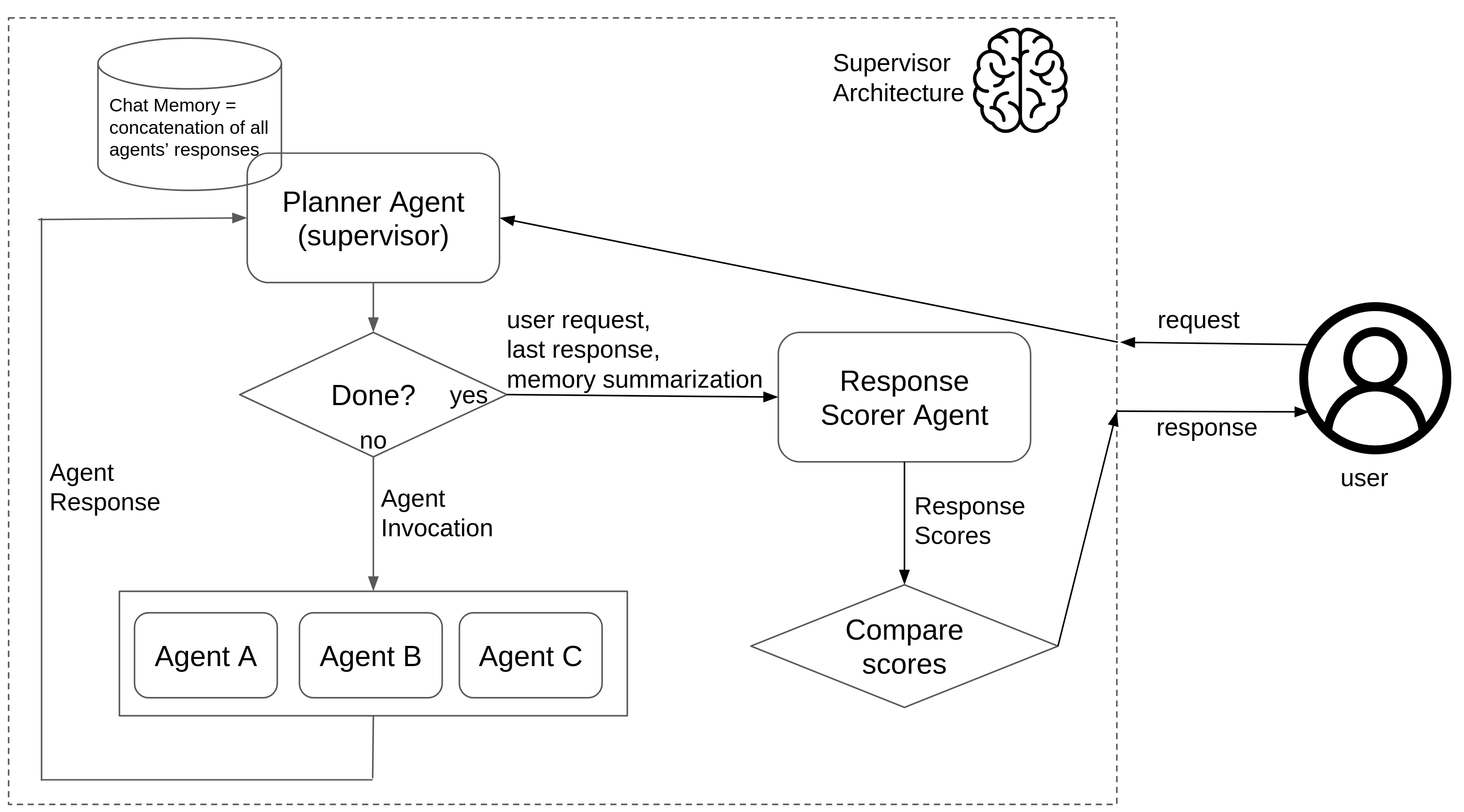
supervisor 用来决定下一步动作的信息来源,也是它的一个关键点。默认情况下,supervisor 只使用本地 chat memory;但在某些场景下,给它提供更完整的上下文会更有帮助,比如对各个 subagent 的对话做摘要,这和 context engineering 一节将讨论的方式很相似,甚至也可以把两种方式结合起来。这 3 种可能由如下枚举表示:
public enum SupervisorContextStrategy {
    CHAT_MEMORY, SUMMARIZATION, CHAT_MEMORY_AND_SUMMARIZATION
}
它可以在构建 supervisor agent 时通过 contextGenerationStrategy 方法进行设置:
AgenticServices.supervisorBuilder()
        .contextGenerationStrategy(SupervisorContextStrategy.SUMMARIZATION)
        .build();
未来还可能继续加入其他 supervisor agent 的自定义扩展点。
为 Supervisor 提供上下文
在很多真实场景中,supervisor 都会受益于一份可选上下文:例如约束、策略或偏好,用于指导它的规划行为(比如“优先使用内部工具”“不要调用外部服务”“货币必须使用 USD”等)。
这份上下文会存储在 AgenticScope 中名为 supervisorContext 的变量里。你可以通过两种方式提供它:
- 构建时配置:
SupervisorAgent bankSupervisor = AgenticServices
        .supervisorBuilder()
        .chatModel(PLANNER_MODEL)
        .supervisorContext("Policies: prefer internal tools; currency USD; no external APIs")
        .subAgents(withdrawAgent, creditAgent, exchangeAgent)
        .responseStrategy(SupervisorResponseStrategy.SUMMARY)
        .build();
- 调用时提供(typed supervisor):添加一个用
@V("supervisorContext")标注的参数:
public interface SupervisorAgent {
    @Agent
    String invoke(@V("request") String request, @V("supervisorContext") String supervisorContext);
}

// Example call (overrides the build-time value for this invocation)
bankSupervisor.invoke(
        "Transfer 100 EUR from Mario's account to Georgios' one",
        "Policies: convert to USD first; use bank tools only; no external APIs"
);
- 调用时提供(untyped supervisor):在输入 map 中设置
supervisorContext:
Map<String, Object> input = Map.of(
        "request", "Transfer 100 EUR from Mario's account to Georgios' one",
        "supervisorContext", "Policies: convert to USD first; use bank tools only; no external APIs"
);

String result = (String) bankSupervisor.invoke(input);
如果两处都提供了值,则调用时传入的 supervisorContext 会覆盖构建时配置的值。
自定义智能体模式
到目前为止讨论的 agentic patterns 都是 langchain4j-agentic 模块开箱即用提供的。但如果这些模式没有一种符合你的应用需求怎么办?这时,你可以创建自己的 custom pattern,按你的需求定制 subagent 之间的交互编排方式。
更具体地说,agentic pattern 本质上就是一份 subagent 执行计划的定义。这个计划可以通过实现下面的 Planner 接口来完成:
public interface Planner {

    default void init(InitPlanningContext initPlanningContext) { }

    default Action firstAction(PlanningContext planningContext) {
        return nextAction(planningContext);
    }

    Action nextAction(PlanningContext planningContext);
}
这个接口有 3 个方法:init、firstAction 和 nextAction。init 会在执行一开始时调用一次,可用于初始化 planner 需要的状态或数据结构。firstAction 用于决定 agentic pattern 应采取的第一个动作;而 nextAction 则会在每次 agent 执行完成后被调用,根据当前 AgenticScope 状态和上一次 agent 执行结果,决定接下来应执行的动作。
需要注意,之所以提供 firstAction,只是因为在很多情况下,单独定义“第一个要调用的 agent”会更方便。但如果你的场景不需要区分第一步,它默认只是把调用转发给 nextAction,因此并不是必须重写它。
firstAction 和 nextAction 返回的 Action 类,表示 agentic pattern 的下一步操作。它可以是“调用一个或多个 subagent”的动作,也可以是“执行已完成”的信号。如果 Action 只指定了一个 subagent 调用,那么它会以顺序方式执行,并在执行 planner 的同一线程中运行;如果包含多个 subagent,它们则会使用提供的 Executor(或者 LangChain4j 默认的执行器)并行执行。
所有内置的 agentic pattern 其实也都是基于这个 Planner 抽象实现的。查看它们的实现会有助于理解其工作方式,并且是编写自定义 pattern 的一个很好的起点。例如,parallel workflow 大概是其中最简单的实现,它定义如下:
public class ParallelPlanner implements Planner {

    private List<AgentInstance> agents;

    @Override
    public void init(InitPlanningContext initPlanningContext) {
        this.agents = initPlanningContext.subagents();
    }

    @Override
    public Action firstAction(PlanningContext planningContext) {
        return call(agents);
    }

    @Override
    public Action nextAction(PlanningContext planningContext) {
        return done();
    }
}
这里,init 方法只是简单保存了 parallel workflow 配置进来的 subagent 列表;而 firstAction 会返回一个 action,用于并行调用这些 agent。一旦这次并行执行完成,就没有后续动作了,因此 nextAction 只需返回 done() 来表示执行终止。
Sequential workflow 的 Planner 只比它稍微复杂一点,因为它需要借助内部游标跟踪下一个要调用的 subagent,并在 nextAction 中返回适当的动作;当全部 subagent 都调用完成后,则返回终止信号。
public class SequentialPlanner implements Planner {

    private List<AgentInstance> agents;
    private int agentCursor = 0;

    @Override
    public void init(InitPlanningContext initPlanningContext) {
        this.agents = initPlanningContext.subagents();
    }

    @Override
    public Action nextAction(PlanningContext planningContext) {
        return agentCursor >= agents.size() ? done() : call(agents.get(agentCursor++));
    }
}
如果你想知道如何基于某个 planner 实现定义 agentic system,例如前面提到的“先根据 topic 生成故事,再按特定 style 和 audience 编辑它”的 sequential workflow,就可以这样创建:
UntypedAgent novelCreator = AgenticServices.plannerBuilder()
                .subAgents(creativeWriter, audienceEditor, styleEditor)
                .outputKey("story")
                .planner(SequentialPlanner::new)
                .build();
它与使用专门的 sequence API 完全等价:
UntypedAgent novelCreator = AgenticServices.sequenceBuilder()
                .subAgents(creativeWriter, audienceEditor, styleEditor)
                .outputKey("story")
                .build();
plannerBuilder() 与其他 agent builder 很类似,只是它额外要求提供一个 Supplier<Planner>,用于返回该 agentic system 应使用的具体 planner 的新实例。当然,一个基于自定义 planner 实现的 agentic system,也可以与 langchain4j-agentic 模块开箱即用提供的其他 agentic pattern 无缝组合。
在理解了 Planner 这个抽象的工作方式之后,你就可以通过实现它来创建自己的 custom agentic pattern。下面几节会讨论两个示例模式,它们位于 langchain4j-agentic-patterns 模块中,可用于不同场景。你也可以按照同样思路创建其他 custom pattern,并将其贡献回 LangChain4j 项目。
面向目标的智能体模式
前面讨论的 workflow patterns 和 supervisor agent,分别代表了 agentic system 可能性的两个极端:前者是完全确定且刚性的,要求你预先决定 agent 的调用顺序;后者则完全灵活和自适应,但调用顺序的决策交给了非确定性的 LLM。在两者之间,其实还存在一些场景,更适合用一种折中方案:让 agent 朝着特定 goal 工作,方式相对灵活,但 agent 的调用顺序仍通过算法来决定。
为了实践这种方法,不仅整个 agentic system 需要定义一个目标,每个 subagent 也需要声明自己的前置条件和后置条件。只有这样,才能计算出能够以尽可能快的方式达到目标的 agent 调用序列。不过,这些信息其实已经隐含在 agentic system 里了,因为这些前后置条件本质上就是每个 agent 所需的输入和产出的输出,而最终 goal 则只是整个 agentic system 想要产出的结果。
基于这个思路,可以为参与 agentic system 的所有 subagent 计算出一个 dependency graph,然后实现一个 Planner:它能够分析 AgenticScope 的初始状态,把它与预期 goal 做比较,再利用这张图来决定一条能够达到该目标的 agent 调用路径。
public class GoalOrientedPlanner implements Planner {

    private String goal;

    private GoalOrientedSearchGraph graph;
    private List<AgentInstance> path;

    private int agentCursor = 0;

    @Override
    public void init(InitPlanningContext initPlanningContext) {
        this.goal = initPlanningContext.plannerAgent().outputKey();
        this.graph = new GoalOrientedSearchGraph(initPlanningContext.subagents());
    }

    @Override
    public Action firstAction(PlanningContext planningContext) {
        path = graph.search(planningContext.agenticScope().state().keySet(), goal);
        if (path.isEmpty()) {
            throw new IllegalStateException("No path found for goal: " + goal);
        }
        return call(path.get(agentCursor++));
    }

    @Override
    public Action nextAction(PlanningContext planningContext) {
        return agentCursor >= path.size() ? done() : call(path.get(agentCursor++));
    }
}
如前所述,这里的 goal 与 planner-based agentic pattern 本身的最终输出一致,而从初始状态到目标的路径则是通过 GoalOrientedSearchGraph 计算出来的。它会分析所有 subagent 的输入 key 和输出 key,然后在图上求出从当前状态到目标之间的最短路径,并据此确定 agent 的调用顺序。
为了给出一个实际例子,我们来尝试构建一个面向目标的 agentic system:它能够从 prompt 中提取人物姓名和星座,生成该星座的 horoscope,在互联网上搜索一则相关故事,最后把这些信息组合成一段有趣的文本。我们可以通过下面这 5 个 agent 来实现这一组任务:
public interface HoroscopeGenerator {
    @SystemMessage("You are an astrologist that generates horoscopes based on the user's name and zodiac sign.")
    @UserMessage("Generate the horoscope for {{person}} who is a {{sign}}.")
    @Agent("An astrologist that generates horoscopes based on the user's name and zodiac sign.")
    String horoscope(@V("person") Person person, @V("sign") Sign sign);
}

public interface PersonExtractor {

    @UserMessage("Extract a person from the following prompt: {{prompt}}")
    @Agent("Extract a person from user's prompt")
    Person extractPerson(@V("prompt") String prompt);
}

public interface SignExtractor {

    @UserMessage("Extract the zodiac sign of a person from the following prompt: {{prompt}}")
    @Agent("Extract a person from user's prompt")
    Sign extractSign(@V("prompt") String prompt);
}

public interface Writer {
    @UserMessage("""
            Create an amusing writeup for {{person}} based on the following:
            - their horoscope: {{horoscope}}
            - a current news story: {{story}}
            """)
    @Agent("Create an amusing writeup for the target person based on their horoscope and current news stories")
    String write(@V("person") Person person, @V("horoscope") String horoscope, @V("story") String story);
}

public interface StoryFinder {

    @SystemMessage("""
            You're a story finder, use the provided web search tools, calling it once and only once,
            to find a fictional and funny story on the internet about the user provided topic.
            """)
    @UserMessage("""
            Find a story on the internet for {{person}} who has the following horoscope: {{horoscope}}.
            """)
    @Agent("Find a story on the internet for a given person with a given horoscope")
    String findStory(@V("person") Person person, @V("horoscope") String horoscope);
}
利用前面开发的 GoalOrientedPlanner,这些 agent 可以像下面这样被组合成一个面向目标的 agentic system:
HoroscopeGenerator horoscopeGenerator = AgenticServices.agentBuilder(HoroscopeGenerator.class)
        .chatModel(baseModel())
        .outputKey("horoscope")
        .build();

PersonExtractor personExtractor = AgenticServices.agentBuilder(PersonExtractor.class)
        .chatModel(baseModel())
        .outputKey("person")
        .build();

SignExtractor signExtractor = AgenticServices.agentBuilder(SignExtractor.class)
        .chatModel(baseModel())
        .outputKey("sign")
        .build();

Writer writer = AgenticServices.agentBuilder(Writer.class)
        .chatModel(baseModel())
        .outputKey("writeup")
        .build();

StoryFinder storyFinder = AgenticServices.agentBuilder(StoryFinder.class)
        .chatModel(baseModel())
        .tools(new WebSearchTool())
        .outputKey("story")
        .build();

UntypedAgent horoscopeAgent = AgenticServices.plannerBuilder()
        .subAgents(horoscopeGenerator, personExtractor, signExtractor, writer, storyFinder)
        .outputKey("writeup")
        .planner(GoalOrientedPlanner::new)
        .build();
如前所述,这个 agentic system 的整体目标是产出 writeup,它也正是这个基于 GOAP 的 planner 自身的 output key。结合所有 subagent 的输入输出信息后,GoalOrientedSearchGraph 构建出的 dependency graph 会像下面这样:
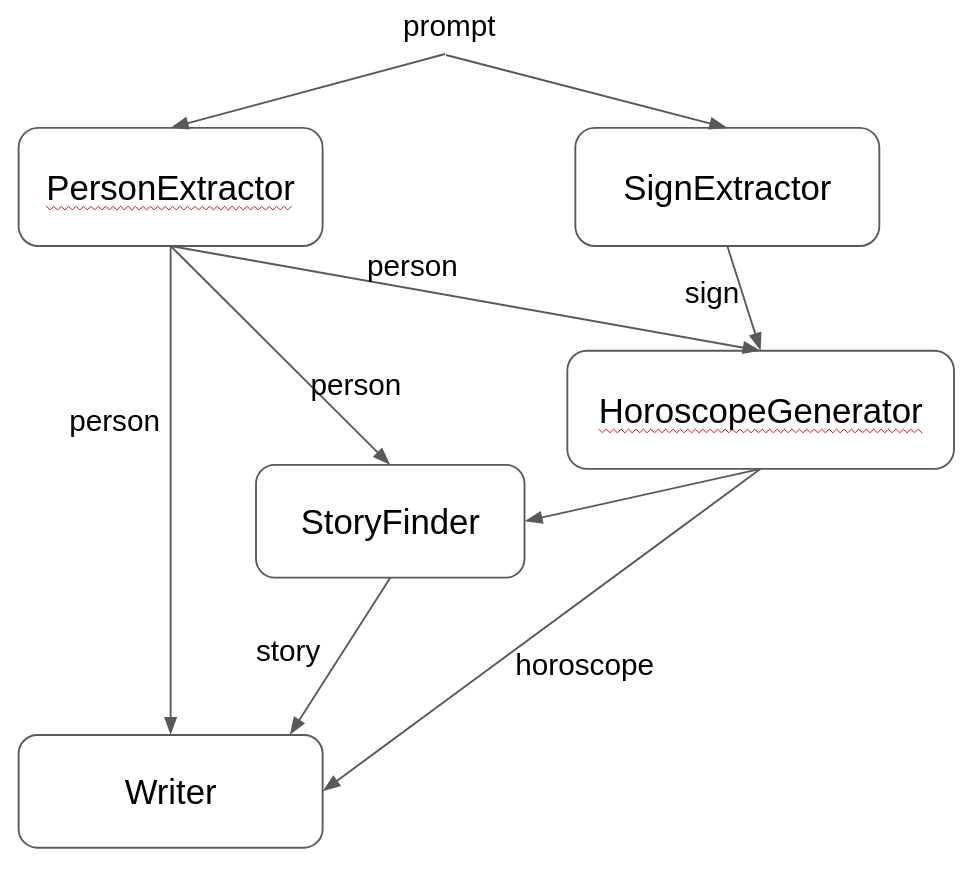
当你用类似 “My name is Mario and my zodiac sign is pisces” 这样的 prompt 调用这个 agentic system 时:
Map<String, Object> input = Map.of("prompt", "My name is Mario and my zodiac sign is pisces");
String writeup = horoscopeAgent.invoke(input);
GoalOrientedPlanner 会先分析 AgenticScope 的初始状态,其中此时只有 prompt 变量。随后它会在 dependency graph 上计算从这个初始状态到目标 writeup 的最短路径,因此得到的 agent 调用序列会是:
Agents path sequence: [extractPerson, extractSign, horoscope, findStory, write]
正如前面提到的,这种 goal oriented agentic pattern 也可以与现有任何其他 agentic pattern 混合组合。例如,它的一个明显限制在于:由于它总是为了用最短路径达到特定目标,因此结构上并不支持 loop。所以在一些场景里,把 loop agentic pattern 作为它的 subagent 组合进去就会很有价值。
点对点智能体模式
到目前为止讨论的所有 agentic system,都是基于集中式、层级式架构。无论是前面那些 workflow pattern 里由一个明确的顶层 agent 以编程方式协调多个 sub-agent,还是更灵活动态的 supervisor pattern,本质上都仍然依赖一个协调者来控制各 sub-agent 之间的交互。这类架构适用于很多应用和场景,但在可扩展性和容错性方面也可能存在局限。因此,我们有时会希望采用另一种面向多 agent system 的 peer-to-peer 方式,通过更分布式、更去中心化的策略来缓解这些限制。
在 peer-to-peer agentic system 中,不存在顶层 agent,所有 agent 都是平等的 peer,它们通过 AgenticScope 的状态进行协调。具体来说,只要某个 agent 所需的输入变量出现在 AgenticScope 中,它就会被触发。而当另一个 agent 的输出改写了其中一个或多个变量时,它又可能再次触发该 agent。整个过程会在以下任一条件满足时终止:AgenticScope 达到稳定状态,再也没有 agent 可以被调用;预定义退出条件满足;或 agent 调用次数达到上限。一个实现了这种 peer-to-peer agentic pattern 的 Planner 可以写成如下形式:
public class P2PPlanner implements Planner {

    private final int maxAgentsInvocations;
    private final BiPredicate<AgenticScope, Integer> exitCondition;

    private int invocationCounter = 0;
    private Map<String, AgentActivator> agentActivators;

    public P2PPlanner(int maxAgentsInvocations, BiPredicate<AgenticScope, Integer> exitCondition) {
        this(null, maxAgentsInvocations, exitCondition);
    }

    @Override
    public void init(InitPlanningContext initPlanningContext) {
        this.agentActivators = initPlanningContext.subagents().stream().collect(toMap(AgentInstance::agentId, AgentActivator::new));
    }

    @Override
    public Action nextAction(PlanningContext planningContext) {
        if (terminated(planningContext.agenticScope())) {
            return done();
        }

        AgentActivator lastExecutedAgent = agentActivators.get(planningContext.previousAgentInvocation().agentId());
        lastExecutedAgent.finishExecution();
        agentActivators.values().forEach(a -> a.onStateChanged(lastExecutedAgent.agent.outputKey()));

        return nextCallAction(planningContext.agenticScope());
    }

    private Action nextCallAction(AgenticScope agenticScope) {
        AgentInstance[] agentsToCall = agentActivators.values().stream()
                .filter(agentActivator -> agentActivator.canActivate(agenticScope))
                .peek(AgentActivator::startExecution)
                .map(AgentActivator::agent)
                .toArray(AgentInstance[]::new);
        invocationCounter += agentsToCall.length;
        return call(agentsToCall);
    }

    private boolean terminated(AgenticScope agenticScope) {
        return invocationCounter > maxAgentsInvocations || exitCondition.test(agenticScope, invocationCounter);
    }
}
这里,P2PPlanner 会跟踪当前为止已执行的 agent 调用次数,并为每个 subagent 使用一个 AgentActivator,根据当前 AgenticScope 的状态判断它是否可被调用。nextAction 方法会先检查是否已经满足退出条件,或者调用次数是否达到上限;如果都没有,就会找出所有当前可激活的 agent,把它们标记为已启动,并返回一个 action 去调用它们。
为了给出一个实际例子,我们来尝试构建一个 peer-to-peer agentic system:它能够围绕某个主题进行科学研究、提出新假设,因此这个服务的 API 可以像下面这样:
public interface ResearchAgent {

    @Agent("Conduct research on a given topic")
    String research(@V("topic") String topic);
}
为了实现这一目标,可以定义下面这 5 个 agent:
public interface LiteratureAgent {

    @SystemMessage("Search for scientific literature on the given topic and return a summary of the findings.")
    @UserMessage("""
            You are a scientific literature search agent.
            Your task is to find relevant scientific papers on the topic provided by the user and summarize them.
            Use the provided tool to search for scientific papers and return a summary of your findings.
            The topic is: {{topic}}
            """)
    @Agent("Search for scientific literature on a given topic")
    String searchLiterature(@V("topic") String topic);
}

public interface HypothesisAgent {

    @SystemMessage("Based on the research findings, formulate a clear and concise hypothesis related to the given topic.")
    @UserMessage("""
            You are a hypothesis formulation agent.
            Your task is to formulate a clear and concise hypothesis based on the research findings provided by the user.
            The topic is: {{topic}}
            The research findings are: {{researchFindings}}
            """)
    @Agent("Formulate hypothesis around a give topic based on research findings")
    String makeHypothesis(@V("topic") String topic, @V("researchFindings") String researchFindings);
}

public interface CriticAgent {

    @SystemMessage("Critically evaluate the given hypothesis related to the specified topic. Provide constructive feedback and suggest improvements if necessary.")
    @UserMessage("""
            You are a critical evaluation agent.
            Your task is to critically evaluate the hypothesis provided by the user in relation to the specified topic.
            Provide constructive feedback and suggest improvements if necessary.
            If you need to, you can also perform additional research to validate or confute the hypothesis using the provided tool.
            The topic is: {{topic}}
            The hypothesis is: {{hypothesis}}
            """)
    @Agent("Critically evaluate a hypothesis related to a given topic")
    String criticHypothesis(@V("topic") String topic, @V("hypothesis") String hypothesis);
}

public interface ValidationAgent {

    @SystemMessage("Validate the provided hypothesis on the given topic based on the critique provided.")
    @UserMessage("""
            You are a validation agent.
            Your task is to validate the hypothesis provided by the user in relation to the specified topic based on the critique provided.
            Validate the provided hypothesis, either confirming it or reformulating a different hypothesis based on the critique.
            The topic is: {{topic}}
            The hypothesis is: {{hypothesis}}
            The critique is: {{critique}}
            """)
    @Agent("Validate a hypothesis based on a given topic and critique")
    String validateHypothesis(@V("topic") String topic, @V("hypothesis") String hypothesis, @V("critique") String critique);
}

public interface ScorerAgent {

    @SystemMessage("Score the provided hypothesis on the given topic based on the critique provided.")
    @UserMessage("""
            You are a scoring agent.
            Your task is to score the hypothesis provided by the user in relation to the specified topic based on the critique provided.
            Score the provided hypothesis on a scale from 0.0 to 1.0, where 0.0 means the hypothesis is completely invalid and 1.0 means the hypothesis is fully valid.
            The topic is: {{topic}}
            The hypothesis is: {{hypothesis}}
            The critique is: {{critique}}
            """)
    @Agent("Score a hypothesis based on a given topic and critique")
    double scoreHypothesis(@V("topic") String topic, @V("hypothesis") String hypothesis, @V("critique") String critique);
}
这些 agent 都会被提供一个可执行科研文献检索的工具,比如从 arXiv 下载学术论文,然后把它们加入 p2p agentic system:
ArxivCrawler arxivCrawler = new ArxivCrawler();

LiteratureAgent literatureAgent = AgenticServices.agentBuilder(LiteratureAgent.class)
        .chatModel(baseModel())
        .tools(arxivCrawler)
        .outputKey("researchFindings")
        .build();
HypothesisAgent hypothesisAgent = AgenticServices.agentBuilder(HypothesisAgent.class)
        .chatModel(baseModel())
        .tools(arxivCrawler)
        .outputKey("hypothesis")
        .build();
CriticAgent criticAgent = AgenticServices.agentBuilder(CriticAgent.class)
        .chatModel(baseModel())
        .tools(arxivCrawler)
        .outputKey("critique")
        .build();
ValidationAgent validationAgent = AgenticServices.agentBuilder(ValidationAgent.class)
        .chatModel(baseModel())
        .tools(arxivCrawler)
        .outputKey("hypothesis")
        .build();
ScorerAgent scorerAgent = AgenticServices.agentBuilder(ScorerAgent.class)
        .chatModel(baseModel())
        .tools(arxivCrawler)
        .outputKey("score")
        .build();

ResearchAgent researcher = AgenticServices.plannerBuilder(ResearchAgent.class)
        .subAgents(literatureAgent, hypothesisAgent, criticAgent, validationAgent, scorerAgent)
        .outputKey("hypothesis")
        .planner(() -> new P2PPlanner(10, agenticScope -> {
            if (!agenticScope.hasState("score")) {
                return false;
            }
            double score = agenticScope.readState("score", 0.0);
            System.out.println("Current hypothesis score: " + score);
            return score >= 0.85;
        }))
        .build();

String hypothesis = researcher.research("black holes");
在这个配置中,researcher 这个 p2p 协调器会接收研究主题作为输入。此时唯一可以立即调用的 agent 是 literatureAgent,因为它是唯一一个所需输入都已经存在于 AgenticScope 中的 agent,在这里就是 topic。调用它之后会产生 researchFindings 变量,并写入 AgenticScope。这个新变量随后触发 HypothesisAgent,它再产出 hypothesis,从而进一步触发 criticAgent。最后,ValidationAgent 会同时使用 hypothesis 和 critique 作为输入,生成一个新的 hypothesis,进而再次触发其他 agent。同时,ScorerAgent 会给这个 hypothesis 打分;当该分数大于等于 0.85 时,或者一共执行了 10 次 agent 调用后,流程终止。下图总结了这次执行中涉及的 agent 与状态变量:
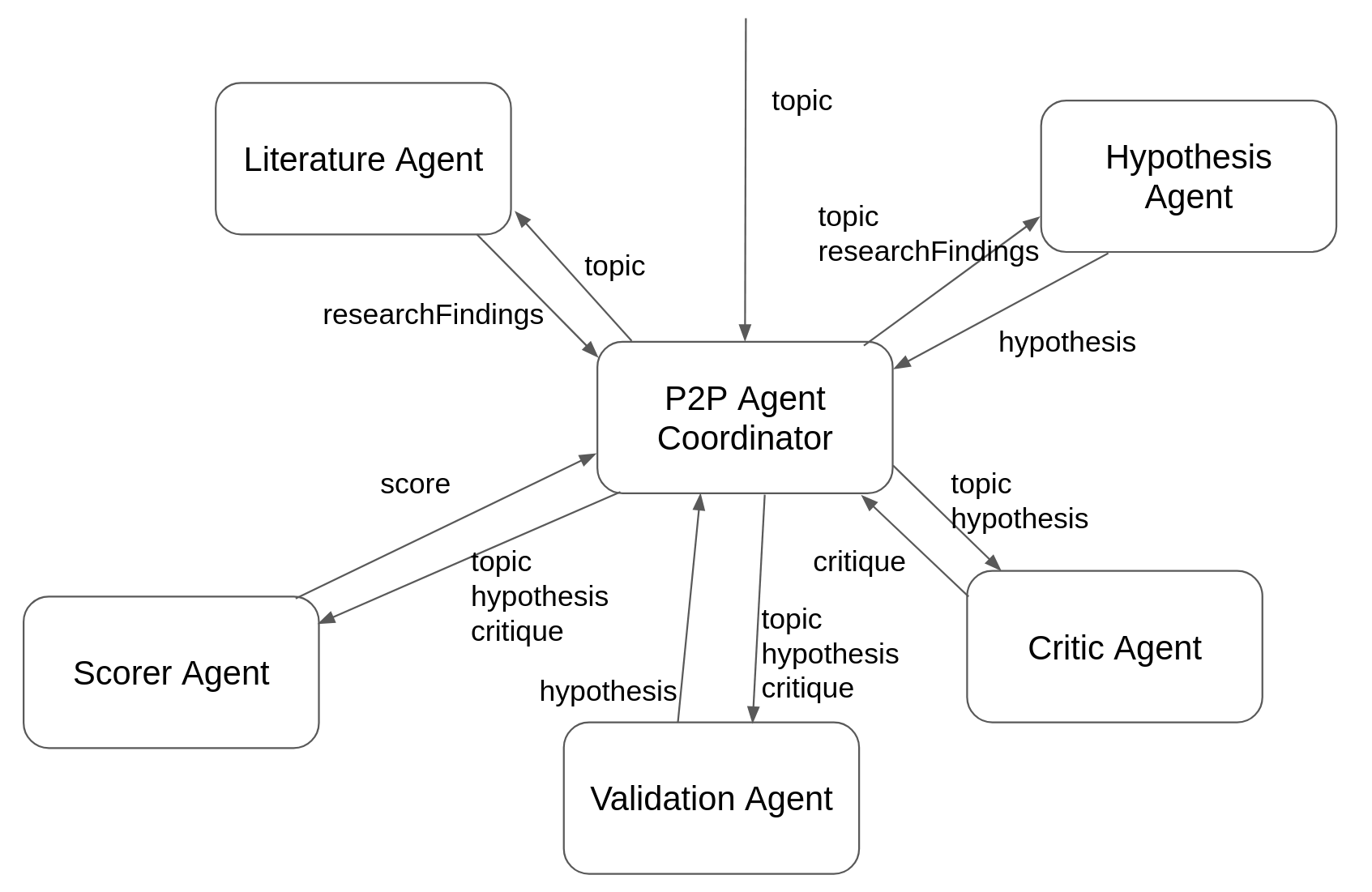
例如,这个示例一次典型运行可能会因为 ScorerAgent 产出的分数超过预设阈值而结束:
Current hypothesis score: 0.95
最终输出可能类似这样:
Based on the provided references, here are some key points about stochastic gravitational wave backgrounds (SGWBs) from primordial black holes (PBHs):

1. **Detection Rates and Sources:**
   - The detection rate of gravity waves emitted during parabolic encounters of stellar black holes in globular clusters was estimated by Kocsis et al. [85].
   - Gravitational wave bursts from PBH hyperbolic encounters were discussed by García-Bellido and Nesseris [93].

2. **Energy Emission:**
   - The energy spectrum of gravitational waves from hyperbolic encounters was studied by De Vittori, Jetzer, and Klein [88].
   - Gravitational wave energy emission and detection rates for PBH hyperbolic encounters were analyzed by García-Bellido and Nesseris [90].

3. **Template Banks:**
   - Template banks for gravitational waveforms from coalescing binary black holes (including non-spinning binaries) were developed by Ajith et al. [92].

4. **Constraints on PBHs:**
   - Constraints on primordial black holes were reviewed by Carr, Kohri, Sendouda, and Yokoyama [98].
   - Universal gravitational wave signatures of cosmological solitons were discussed by Lozanov, Sasaki, and Takhistov [100].

5. **Induced SGWBs:**
   - Doubly peaked induced stochastic gravitational wave backgrounds were tested for baryogenesis from primordial black holes by Bhaumik et al. [101].
   - Distinct signatures of spinning PBH domination and evaporation, including doubly peaked gravitational waves, dark relics, and CMB complementarity, were explored by Bhaumik et al. [101].

6. **Future Detectors:**
   - Future detectors like Taiji, LISA, DECIGO, Big Bang Observer, Cosmic Explorer, Einstein Telescope, and KAGRA are expected to contribute significantly to the detection of SGWBs from PBHs.

7. **Pulsar Timing Arrays:**
   - Pulsar timing arrays have been used to search for an isotropic stochastic gravitational wave background [73-75].

8. **Template Banks and Simulations:**
   - Template banks like those developed by Ajith et al. are crucial for matching observed signals with theoretical predictions.
非 AI 智能体
到目前为止,我们讨论的都是 AI agents,也就是基于 LLM 的 agent,它们用于执行需要自然语言理解和生成的任务。不过,langchain4j-agentic 模块同样支持 non-AI agents,它们可以用于执行那些不需要自然语言处理的任务,例如调用 REST API 或执行某个命令。从性质上说,这类 non-AI agents 更接近 tools,但在这个上下文里,把它们建模为 agent 会更方便,因为这样它们就能和 AI agents 以同样方式参与组合,从而构成更强大、更完整的 agentic system。
例如,在 supervisor 示例中使用的 ExchangeAgent 也许并不适合建模成 AI agent,更合理的做法是把它定义为一个 non-AI agent,仅负责调用 REST API 来完成货币兑换。
public class ExchangeOperator {

    @Agent(value = "A money exchanger that converts a given amount of money from the original to the target currency",
            outputKey = "exchange")
    public Double exchange(@V("originalCurrency") String originalCurrency, @V("amount") Double amount, @V("targetCurrency") String targetCurrency) {
        // invoke the REST API to perform the currency exchange
    }
}
这样它就可以像 supervisor 可用的其他 subagent 一样被使用:
WithdrawAgent withdrawAgent = AgenticServices
        .agentBuilder(WithdrawAgent.class)
        .chatModel(BASE_MODEL)
        .tools(bankTool)
        .build();
CreditAgent creditAgent = AgenticServices
        .agentBuilder(CreditAgent.class)
        .chatModel(BASE_MODEL)
        .tools(bankTool)
        .build();

SupervisorAgent bankSupervisor = AgenticServices
        .supervisorBuilder()
        .chatModel(PLANNER_MODEL)
        .subAgents(withdrawAgent, creditAgent, new ExchangeOperator())
        .build();
从本质上说,在 langchain4j-agentic 中,agent 可以是任何 Java 类,只要它恰好有且只有一个方法被 @Agent 注解标注即可。
最后,non-AI agents 也可以用来读取 AgenticScope 状态或对其执行一些小操作。因此,AgenticServices 提供了一个 agentAction 工厂方法,可以从 Consumer<AgenticServices> 创建一个简单 agent。例如,假设你有一个 scorer agent,它输出的 score 是 String 类型,而后续的 reviewer agent 则需要把这个 score 当作 double 使用。这时这两个 agent 就不兼容了,但你可以使用 agentAction 改写 AgenticScope 中的 score 状态,把第一个 agent 的输出适配成第二个 agent 所需的格式:
UntypedAgent editor = AgenticServices.sequenceBuilder()
        .subAgents(
                scorer,
                AgenticServices.agentAction(agenticScope -> agenticScope.writeState("score", Double.parseDouble(agenticScope.readState("score", "0.0")))),
                reviewer)
        .build();
人在回路
构建 agentic system 时,另一种常见需求是把人纳入闭环,让系统在继续执行某些动作前,可以向用户索取缺失信息或请求审批。这种 human-in-the-loop 能力同样可以被视为一种特殊的 non-AI agent,并因此以 agent 的形式实现。
public record HumanInTheLoop(Function<AgenticScope, ?> responseProvider) {

    @Agent("An agent that asks the user for missing information")
    public Object askUser(AgenticScope scope) {
        return responseProvider.apply(scope);
    }
}
这个实现非常朴素,但也因此非常通用。它基于单个函数工作:该函数以当前 AgenticScope 作为输入,从中提取上下文以构造合适的问题,然后返回应该提供给用户的响应。
langchain4j-agentic 模块开箱即用提供的 HumanInTheLoop agent,允许你同时定义这个函数、agent 描述以及用户响应写入的输出变量。
例如,假设我们定义了如下 AstrologyAgent:
public interface AstrologyAgent {
    @SystemMessage("""
        You are an astrologist that generates horoscopes based on the user's name and zodiac sign.
        """)
    @UserMessage("""
        Generate the horoscope for {{name}} who is a {{sign}}.
        """)
    @Agent("An astrologist that generates horoscopes based on the user's name and zodiac sign.")
    String horoscope(@V("name") String name, @V("sign") String sign);
}
那么就可以创建一个 sequence workflow,同时使用这个 AI agent 和一个 HumanInTheLoop agent,在生成 horoscope 之前先向用户询问星座信息。这里的问题会输出到控制台标准输出,而用户回答则从标准输入读取:
HumanInTheLoop humanInTheLoop = AgenticServices.humanInTheLoopBuilder()
        .description("An agent that asks the zodiac sign of the user")
        .outputKey("sign")
        .responseProvider(scope -> {
            System.out.println("Hi " + scope.readState("name") + ", what is your sign?");
            System.out.print("> ");
            try {
                BufferedReader reader = new BufferedReader(new InputStreamReader(System.in));
                return reader.readLine();
            } catch (IOException e) {
                throw new RuntimeException("Failed to read input", e);
            }
        })
        .build();

AstrologyAgent astrologyAgent = AgenticServices.agentBuilder(AstrologyAgent.class)
        .chatModel(baseModel())
        .outputKey("horoscope")
        .build();

UntypedAgent horoscopeAgent = AgenticServices.sequenceBuilder()
        .subAgents(humanInTheLoop, astrologyAgent)
        .outputKey("horoscope")
        .build();
这样,当用户像下面这样调用 horoscopeAgent 时:
horoscopeAgent.invoke(Map.of("name", "Mario"));
sequence 会先调用 HumanInTheLoop agent,让它询问用户缺失的 zodiac sign,从而产生如下输出:
Hi Mario, what is your sign?
>
然后等待用户回答,再把这个回答交给 AstrologyAgent 来生成 horoscope。
由于用户可能需要一些时间才能给出答案,因此可以而且通常也建议把 HumanInTheLoop agent 配置成 asynchronous。这样一来,那些不依赖用户输入的 agent 仍可继续执行,而 agentic system 只会在真正需要该回答时才等待。
记忆与上下文工程
到目前为止,讨论过的所有 agent 都是无状态的,也就是说,它们不会保留任何先前交互的上下文或记忆。不过,就像其他 AI service 一样,你同样可以为 agent 提供 ChatMemory,让它在多次调用之间保持上下文。
要为前面的 MedicalExpert 增加 memory,只需要在它的方法签名里添加一个被 @MemoryId 标注的字段:
public interface MedicalExpertWithMemory {

    @UserMessage("""
        You are a medical expert.
        Analyze the following user request under a medical point of view and provide the best possible answer.
        The user request is {{request}}.
        """)
    @Agent("A medical expert")
    String medical(@MemoryId String memoryId, @V("request") String request);
}
并在构建 agent 时设置 memory provider:
MedicalExpertWithMemory medicalExpert = AgenticServices
        .agentBuilder(MedicalExpertWithMemory.class)
        .chatModel(BASE_MODEL)
        .chatMemoryProvider(memoryId -> MessageWindowChatMemory.withMaxMessages(10))
        .outputKey("response")
        .build();
对于单独使用的 agent 来说,这通常已经足够;但对于参与 agentic system 的 agent 来说,这种方式可能就不够用了。假设技术专家和法律专家也都配置了 memory,同时 ExpertRouterAgent 也被改成带 memory:
public interface ExpertRouterAgentWithMemory {

    @Agent
    String ask(@MemoryId String memoryId, @V("request") String request);
}
如果连续对这个 agent 发起下面两次调用:
String response1 = expertRouterAgent.ask("1", "I broke my leg, what should I do?");

String legalResponse1 = expertRouterAgent.ask("1", "Should I sue my neighbor who caused this damage?");
结果不会符合预期。因为第二个问题会被路由到 legal expert,而 legal expert 在此时其实是第一次被调用,因此它并不知道前一个问题发生过什么。
为了解决这个问题,就必须在 legal expert 调用前把上下文和之前发生的事情提供给它,而这正是 AgenticScope 自动记录的信息能够发挥作用的地方。
具体来说,AgenticScope 会记录所有 agent 的调用序列,并且可以把这些调用拼接成一段单独的对话上下文。这个上下文可以直接使用,也可以在需要时先摘要成更短的版本,例如定义一个 ContextSummarizer agent:
public interface ContextSummarizer {

    @UserMessage("""
        Create a very short summary, 2 sentences at most, of the
        following conversation between an AI agent and a user.

        The user conversation is: '{{it}}'.
        """)
    String summarize(String conversation);
}
借助这个 agent,就可以重新定义 legal expert,并把先前对话摘要作为上下文提供给它,让它在回答新问题时考虑之前发生的交互:
LegalExpertWithMemory legalExpert = AgenticServices
        .agentBuilder(LegalExpertWithMemory.class)
        .chatModel(BASE_MODEL)
        .chatMemoryProvider(memoryId -> MessageWindowChatMemory.withMaxMessages(10))
        .context(agenticScope -> contextSummarizer.summarize(agenticScope.contextAsConversation()))
        .outputKey("response")
        .build();
更一般地说,传给某个 agent 的上下文可以是任何基于 AgenticScope 状态的函数。这样设置之后,当用户再询问 legal expert 是否应该起诉造成损害的邻居时,它就可以参考之前与 medical expert 的对话,从而给出更充分的回答。
在内部,agentic framework 是通过自动改写发给 legal expert 的 user message,把前面对话的摘要插进去,从而提供额外上下文的。因此,在这个例子中,实际发给 legal expert 的 user message 会类似于:
"Considering this context \"The user asked about what to do after breaking their leg, and the AI provided medical advice on immediate actions like immobilizing the leg, applying ice, and seeking medical attention.\"
You are a legal expert.
Analyze the following user request under a legal point of view and provide the best possible answer.
The user request is Should I sue my neighbor who caused this damage?."
这里讨论的这种上下文摘要,是一种非常通用的 context generation 方式,因此可以用更方便的方法直接配置到 agent 上,即使用 summarizedContext:
LegalExpertWithMemory legalExpert = AgenticServices
        .agentBuilder(LegalExpertWithMemory.class)
        .chatModel(BASE_MODEL)
        .chatMemoryProvider(memoryId -> MessageWindowChatMemory.withMaxMessages(10))
        .summarizedContext("medical", "technical")
        .outputKey("response")
        .build();
这样做时,内部会自动使用前面提到的 ContextSummarizer agent,并使用与当前 agent 相同的 chat model 来执行它。你还可以为该方法传入若干 agent 名称的可变参数,以便只对这些指定 agent 的上下文做摘要,而不是对 agentic system 中所有 agent 的上下文都做摘要。
AgenticScope 注册与持久化
AgenticScope 是一种瞬时数据结构,会在 agentic system 执行期间创建并使用。对于每个用户、每个 agentic system,都只会有一个 AgenticScope。在无状态执行中,如果没有使用 memory,那么 AgenticScope 会在执行结束后自动丢弃,其状态也不会持久化到任何地方。
相反,如果 agentic system 使用了 memory,那么 AgenticScope 就会被保存到内部 registry 中。此时,为了支持用户与 agentic system 以有状态、对话式的方式持续交互,这个 AgenticScope 会一直留在 registry 里。因此,当某个特定 ID 的 AgenticScope 不再需要时,必须显式将其从 registry 中移除。要做到这一点,agentic system 的根 agent 需要实现 AgenticScopeAccess 接口,这样你就可以在其上调用 evictAgenticScope 方法,并传入要移除的 AgenticScope ID。
agent.evictAgenticScope(memoryId);
无论是 AgenticScope 还是其 registry,本质上都只是纯内存数据结构。这对简单 agentic system 来说通常已经足够,但某些场景中,你可能希望把 AgenticScope 的状态持久化到更可靠的存储介质中,比如数据库或文件系统。为此,langchain4j-agentic 模块提供了一个 SPI,允许你接入自定义持久化层,即实现 AgenticScopeStore 接口。你既可以通过编程方式设置它:
AgenticScopePersister.setStore(new MyAgenticScopeStore());
也可以使用标准 Java Service Provider 机制,创建一个名为 META-INF/services/dev.langchain4j.agentic.scope.AgenticScopeStore 的文件,在其中写入实现 AgenticScopeStore 接口的类的完整限定名。
AgenticScope 与 Agentic 系统可恢复性
当配置了 AgenticScopeStore 后,langchain4j-agentic 模块会提供内建的 recoverability 支持,使 agentic system 能在进程崩溃或重启之后,从上次中断的位置继续执行。这对包含 human-in-the-loop 步骤的长时间运行 workflow 尤其有价值,因为这类流程可能会被有意暂停,并在稍后恢复。
recoverability 基于两项协同工作的机制:逐步 checkpoint 和 planner 执行状态持久化。
每次 agent 调用之后,当前 AgenticScope 都会自动 checkpoint 到配置好的 store 中。这意味着 agent 通过 writeState 写入的所有中间状态都会被可靠持久化。除此之外,执行循环还会保存 planner 的内部位置状态(例如 sequence 走到了第几个 agent),这样在恢复时 workflow 会从正确步骤继续,而不是从头重启。
Planner 接口的实现可以通过两个方法选择性参与这套机制:
// Returns the planner's current internal state for persistence
default Map<String, Object> executionState() { return Map.of(); }

// Restores internal state from a previously saved map
default void restoreExecutionState(Map<String, Object> state) { }
例如,像 sequential 和 loop 这种有状态 planner,就会实现这些方法,以保存和恢复它们的游标位置及迭代计数。而无状态 planner(例如 ParallelPlanner 或 ConditionalPlanner)则会直接使用默认的空实现。你自己的 custom Planner 也可以重写这些方法,从而参与 recoverability。
为了给出一个实际例子,假设有一个订单处理 workflow,其中大额订单在发货前必须先经过人工审批。这个 workflow 由三个步骤构成:校验订单、等待人工批准,然后发货。
public interface OrderWorkflow extends AgenticScopeAccess {
    @Agent
    String processOrder(@MemoryId String orderId, @V("order") String orderDetails);
}
这里的 @MemoryId 注解至关重要,因为它会激活持久化 scope,而这是 recoverability 的前提。接着,把这个 workflow 构建成由 3 个 agent 组成的 sequence:
// Step 1: Validate the order and write results to shared state
AgenticScopeAction validateOrder = AgenticServices.agentAction(scope -> {
    String order = scope.readState("order", "");
    scope.writeState("validated_order", "VALIDATED: " + order);
});

// Step 2: Pause for human approval using PendingResponse
HumanInTheLoop approvalGate = AgenticServices.humanInTheLoopBuilder()
        .description("Wait for manager approval on large orders")
        .outputKey("approval")
        .responseProvider(scope -> new PendingResponse<>("manager-approval"))
        .build();

// Step 3: Finalize based on the approval decision
AgenticScopeAction shipOrder = AgenticServices.agentAction(scope -> {
    String validated = scope.readState("validated_order", "");
    String approval = scope.readState("approval", "");
    scope.writeState("result", "Order " + validated + " — " + approval);
});

OrderWorkflow workflow = AgenticServices.sequenceBuilder(OrderWorkflow.class)
        .subAgents(validateOrder, approvalGate, shipOrder)
        .outputKey("result")
        .build();
当这个 workflow 运行时,它会先校验订单,然后在 HumanInTheLoop 步骤处阻塞,等待外部输入。此时,完整的 scope 会被 checkpoint 到 store 中,其中包括已校验的订单数据、planner 的游标位置(第 2 步已完成),以及 PendingResponse。
PendingResponse 类是 DelayedResponse 的一种实现,它可以在不启动后台线程的情况下,由外部完成响应。与会立即在线程池中开始执行的 AsyncResponse 不同,PendingResponse 创建的是一个初始未完成的 future,必须显式调用 complete() 方法来结束。经过序列化和反序列化后,它会重新生成一个新的未完成 future,从而允许外部系统重新连接并完成该响应。
如果进程崩溃或重启,就可以恢复该 scope 并继续 workflow:
// After restart: load the persisted scope and provide the human response
AgenticScope recovered = workflow.getAgenticScope("order-12345");

// Replace the PendingResponse with the actual human decision
recovered.writeState("approval", "APPROVED by manager");

// Re-invoke with the same order ID — the planner resumes from step 3
String result = workflow.processOrder("order-12345", "1000 widgets");
// → "Order VALIDATED: 1000 widgets — APPROVED by manager"
SequentialPlanner 会从 checkpoint 保存的状态中恢复游标,并跳过已经完成的步骤(校验和审批),只执行最后的发货步骤。
另一种情况是:如果进程并没有重启,而 workflow 只是正在等待人工输入,那么 PendingResponse 也可以直接在运行中的流程上完成:
// Complete the pending response in-flight (e.g., from a REST endpoint)
AgenticScope scope = workflow.getAgenticScope("order-12345");
scope.completePendingResponse("manager-approval", "APPROVED by manager");
这样会解除等待线程的阻塞,workflow 会在无需重启的情况下继续进入发货步骤。
A2A 集成
附加模块 langchain4j-agentic-a2a 提供了与 A2A 协议的无缝集成,使你能够构建可以使用远程 A2A server agents 的 agentic system,并且还能把它们与本地定义的其他 agent 混合使用。
例如,如果最开始示例中的 CreativeWriter agent 是定义在某个远程 A2A server 上的,那么你可以创建一个 A2ACreativeWriter agent。它的使用方式与本地 agent 完全相同,只不过底层调用的是远程 agent。
UntypedAgent creativeWriter = AgenticServices
        .a2aBuilder(A2A_SERVER_URL)
        .inputKeys("topic")
        .outputKey("story")
        .build();
agent 能力描述会自动从 A2A server 提供的 agent card 中获取。不过,这张 card 不会提供输入参数名,因此需要你通过 inputKeys 方法显式指定。
另一种方式是,为这个 A2A agent 定义一个本地接口,例如:
public interface A2ACreativeWriter {

    @Agent
    String generateStory(@V("topic") String topic);
}
这样就可以以更强类型的方式使用它,并且输入名会自动从方法参数推断出来。
A2ACreativeWriter creativeWriter = AgenticServices
        .a2aBuilder(A2A_SERVER_URL, A2ACreativeWriter.class)
        .outputKey("story")
        .build();
此后,这个 agent 就可以像本地 agent 一样使用,并且在定义 workflow 或作为 supervisor 的 subagent 时,与本地 agent 混合搭配。
远程 A2A agent 必须返回 Task 类型。
基于 MCP 的工具智能体
附加模块 langchain4j-agentic-mcp 允许你把单个 MCP tool 包装成 agentic system 中的 non-AI agent。不同于常规 agent 通过 LLM 工作,MCP tool agent 只是直接执行 MCP tool 并返回结果。这使得你可以把 MCP tools 和其他 agents 组合到更大的 agentic system 中,而在 tool 执行本身不必经过 LLM。
要创建 MCP tool agent,请使用 McpAgent.builder() 并传入 McpClient 实例。builder 会向 MCP server 查询 tool specification(名称、描述、输入 schema),并创建一个把调用直接转发给该 tool 的 agent。
例如,如果某个 MCP server 暴露了一个 generate_story tool,就可以把它包装成一个 untyped agent:
McpClient mcpClient = new DefaultMcpClient.Builder()
        .transport(myMcpTransport)
        .build();

UntypedAgent storyGenerator = McpAgent.builder(mcpClient)
        .toolName("generate_story")
        .inputKeys("topic")
        .outputKey("story")
        .build();

String story = (String) storyGenerator.invoke(Map.of("topic", "dragons and wizards"));
toolName 用于在 MCP server 暴露多个工具时,指定要绑定的那一个。如果 server 只暴露了一个工具,那么 toolName 就可以省略,此时会自动选择唯一可用的工具。inputKeys 则用于指定 tool 输入参数的名称;对于 untyped agent,如果不显式提供,它们也会从 tool 的 JSON schema 中自动推断。
和其他 agent 一样,MCP tool agent 也可以通过 typed interface 创建:
public interface StoryGenerator {

    @Agent
    String generateStory(@V("topic") String topic);
}

StoryGenerator storyGenerator = McpAgent.builder(mcpClient, StoryGenerator.class)
        .toolName("generate_story")
        .outputKey("story")
        .build();

String story = storyGenerator.generateStory("dragons and wizards");
在这种情况下,输入参数名会从方法参数(或其 @V 注解)推断出来,而返回类型则决定了如何解析 tool 返回的文本结果。
最后,MCP tool agent 也可以通过 @McpClientAgent 注解以声明式方式定义。@McpClientSupplier 注解用于标记一个返回 McpClient 实例的静态方法。
public interface DeclarativeMcpStoryGenerator {

    @McpClientAgent(toolName = "generate_story", outputKey = "story",
            description = "Generates a story based on the given topic")
    String generateStory(@V("topic") String topic);

    @McpClientSupplier
    static McpClient mcpClient() {
        McpTransport transport = new StreamableHttpMcpTransport.Builder()
                .url("http://localhost:8081/mcp")
                .build();
        return new DefaultMcpClient.Builder()
                .transport(transport)
                .build();
    }
}